
What an “objection library” is and why teams struggle to keep one current
An objection library is a living playbook of real buyer pushback—pricing, security, timing, internal politics, competitor comparisons—paired with responses that actually worked in the moment. In theory, it should be the fastest way to onboard new reps, tighten messaging, and help marketing spot patterns across deals. In practice, most libraries rot because they rely on manual tagging.
Manual tagging fails for predictable reasons: it’s time-consuming, inconsistent across reps, and biased toward the loudest or most recent deals. Even when teams commit to it, the “library” becomes a handful of curated notes rather than a searchable map of what buyers truly say.
The alternative is a workflow that turns your existing sales call transcripts into a searchable, team-wide objection playbook automatically—so the library grows as conversations happen.
The core workflow in plain terms
The “Objection Library” workflow has one goal: take unstructured transcripts and produce structured, retrievable objection knowledge without asking humans to label every line.
At a high level, you’ll do five things:
- Capture transcripts reliably across sales calls.
- Extract objections and context with an LLM, using consistent schemas.
- Normalize and cluster similar objections so you don’t end up with 80 variants of “too expensive.”
- Index for search and retrieval so reps can find the best examples fast.
- Publish and route insights into the tools your team already uses.
Step 1: Get clean transcripts and consistent metadata
Everything downstream depends on the quality and consistency of your transcript inputs. If transcripts are missing speakers, full of audio artifacts, or detached from deal context, your objection library becomes a junk drawer.
This is where an AI meeting partner earns its keep. For example, Fathom records and transcribes calls, then produces immediate summaries and action items. For teams, the useful detail is not just the transcript—it’s the shared visibility across conversations (global search, folders, comments, keyword alerts) and the ability to sync structured outputs into systems like Salesforce or HubSpot.
Minimum metadata to attach to each call before processing:
- Account and opportunity ID
- Deal stage (discovery, evaluation, negotiation)
- Persona or role (e.g., security, finance, end user)
- Competitors mentioned (if any)
- Call date and owner
If you already have this in your CRM, the workflow should pull it automatically rather than asking reps to enter it.
Step 2: Extract objections with a structured prompt, not a vague one
The biggest mistake teams make is asking an LLM to “summarize objections” and hoping the output is consistent. You’ll get different formats every time, which makes search and clustering painful.
Instead, extract objections into a fixed JSON-like schema. Each objection record should include:
- Objection text (the buyer’s words, or a tight paraphrase)
- Category (pricing, security, features, timing, authority, competition, implementation)
- Strength (soft concern vs hard blocker)
- Context (deal stage, persona, triggering topic)
- Response (what the rep said)
- Outcome signal (did the buyer soften, ask follow-ups, move on, or double down)
- Evidence (timestamp ranges or transcript snippets to link back)
That last point—evidence—is what turns a playbook into coaching material. It lets a rep click straight into the moment, review delivery, and reuse phrasing appropriately.
Step 3: Normalize and deduplicate without hand-curation
Once you extract objections, you’ll quickly hit a volume problem: many objections are the same idea expressed differently. If you don’t normalize, search results become noisy and the “library” stops feeling trustworthy.
Normalization is a two-layer approach:
- Rule-based cleanup: standardize currency mentions, trim filler language, map obvious synonyms (e.g., “InfoSec” to “security”).
- Semantic clustering: embed objection texts and group them by similarity. Within each cluster, generate a canonical label like “Budget not approved this quarter” or “Security review will delay timeline.”
You do not need perfect clustering. You need stable clusters that improve retrieval and allow reporting trends. A practical pattern is to keep clusters slightly broader, then let filters (persona, stage, industry) narrow the results.
Step 4: Build retrieval that matches how reps actually search
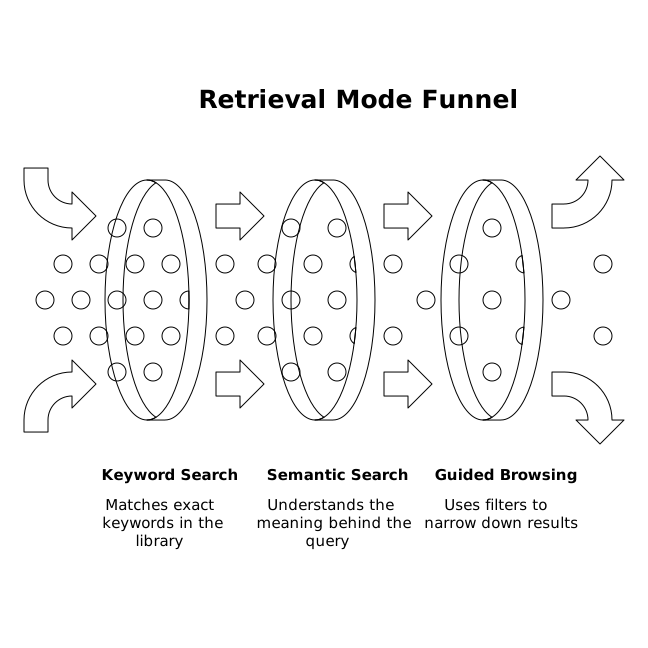
A good objection library supports three retrieval modes:
- Keyword search: “SOC 2,” “procurement,” “pilot,” “discount.”
- Semantic search: “They want to delay until next quarter” should find “timing / budget cycle” clusters.
- Guided browsing: filters for category, persona, stage, and competitor mentions.
This is also where the transcript system matters. If your team already uses shared folders, playlists, and search across calls, you can connect the objection index back to source calls so results aren’t just abstract notes—they’re clickable proof.
Many teams also add an “Ask” layer on top: a simple internal chat that answers, “How do we handle the pricing objection in mid-market security deals?” and returns the top clusters plus best call moments.
Step 5: Publish into the places work happens
If your library lives in a standalone doc, it will be ignored. Publishing should be automated and lightweight:
- Slack: weekly digest of emerging objections and the top-performing responses.
- CRM: attach objection highlights to the opportunity record so the next call starts informed.
- Enablement wiki: maintain a canonical page per objection cluster with example clips and updated messaging.
To keep the workflow maintainable as it grows, use clear branching logic and strict step boundaries (ingest → extract → cluster → index → publish). If you’re designing this in a no-code or low-code automation tool, the logic patterns matter; this is one of the few cases where a little architecture prevents a lot of future rework. The patterns in Branching Logic Patterns to Keep No-Code Workflows Maintainable are a useful reference for keeping the system understandable as you add edge cases.
Quality controls that prevent a “smart” library from becoming a risky one
Because this workflow creates internal guidance, guardrails matter:
- Confidence thresholds: if the model is unsure an objection is present, store it as “candidate” rather than “confirmed.”
- Redaction: remove sensitive data (personal details, access tokens, confidential pricing terms) before indexing.
- Versioned messaging: keep a current recommended response, but preserve historical examples for coaching.
- Feedback loop: let reps upvote helpful examples or flag mismatches. Use that signal to refine clustering and ranking.
For teams that operate with strict operational discipline, you can instrument each workflow step and enforce per-step budgets (time, failures, retries). If you already use observability for data workflows, the approach in Enforcing Per-Step SLOs in DAG Workflows with OpenTelemetry Spans can translate cleanly to objection extraction pipelines.
What the finished objection library enables
Once this is running, you get compounding benefits without asking reps to do extra work:
- Faster onboarding because new reps can search real examples by persona and stage.
- More consistent messaging because responses evolve from evidence, not anecdotes.
- Better product and marketing feedback because you can quantify which objections are rising and where.
- Coaching that scales because managers can review clusters and highlight clips, not random call snippets.
The key is that the library is built from real conversations as they happen—captured, extracted, organized, and published automatically—so it stays current without manual tagging becoming everyone’s second job.