Shipping UI changes without breaking existing users
No-code apps evolve fast: you rename fields, reorder sections, add steps, or redesign screens to improve conversions. The problem is that many users already have saved drafts, bookmarks, deep links, or automations that expect the old screen structure. A “Versioned UI” pattern lets you ship new screens while keeping old ones working—so you can iterate without forcing a risky “big bang” migration.
This pattern is especially useful when you build production web apps in a visual builder like WeWeb, where UI and workflows are easy to change, but real users depend on stable behavior. Used well, UI versioning feels invisible to users: they just keep completing tasks, even as the product improves.
What the Versioned UI pattern is
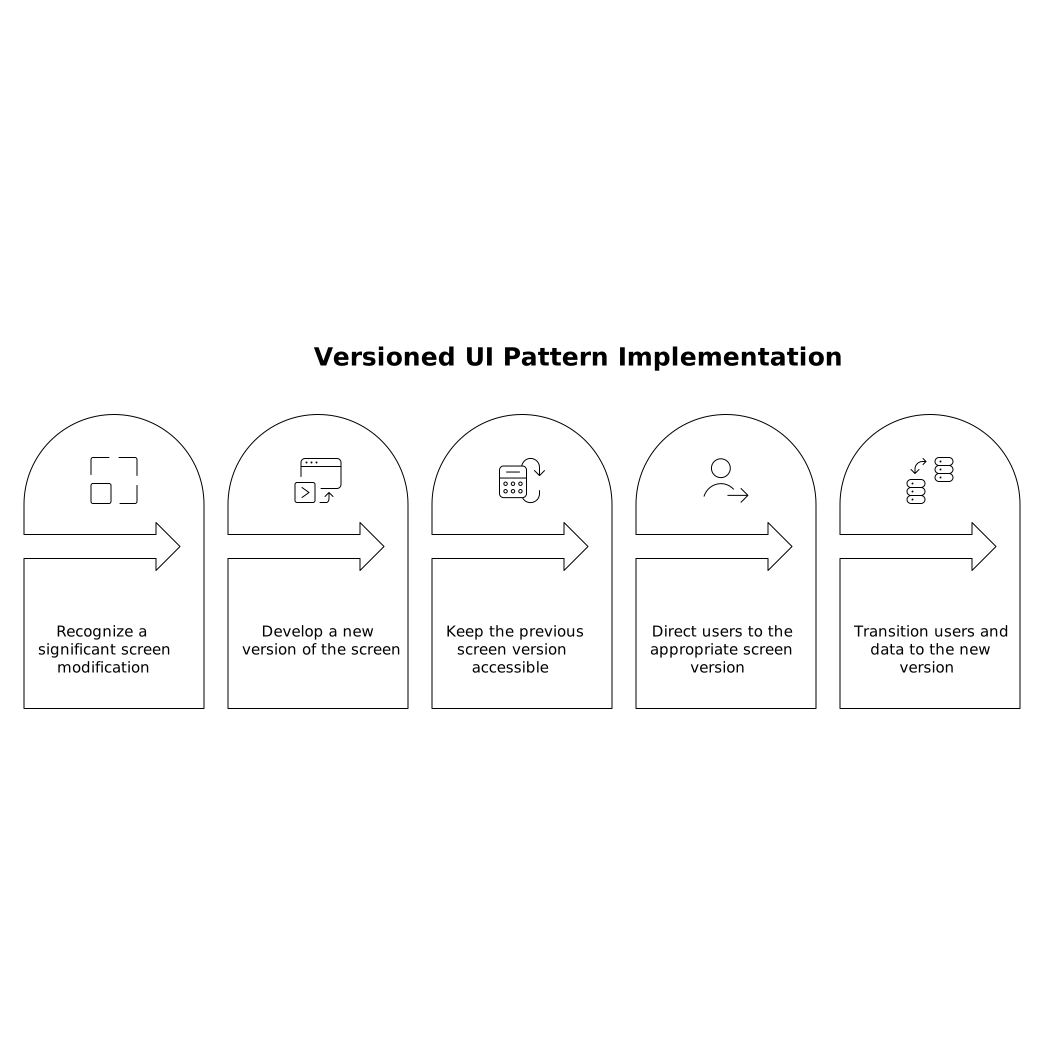
The Versioned UI pattern treats each meaningful screen change as a new version of the same “contract.” Instead of overwriting the screen and hoping nothing breaks, you:
- Keep the old screen (or its behavior) available.
- Introduce a new screen version for new sessions or targeted segments.
- Route users to the right version based on clear rules.
- Gradually migrate users and data when you’re ready.
Think of it like API versioning, but for front-end screens and flows. You’re acknowledging that UI is part of the product interface, not just decoration.
When you need UI versioning in a no-code app
You don’t need this for every pixel tweak. You need it when changes affect user outcomes, saved state, or workflow assumptions. Common triggers include:
- Multi-step onboarding changes (new steps, reordered steps, different validation).
- New required fields added to an existing form or checklist.
- Renaming or re-meaning a field (e.g., “Company size” becomes “Employees worldwide”).
- Deep links shared in emails or tickets that point to a specific screen.
- Role-based experiences where admins and end users must see different UI evolution timelines.
In no-code tools, it’s easy to change a screen; it’s harder to guarantee all the downstream expectations still hold. Versioning gives you a deliberate safety net.
Core building blocks of a Versioned UI
1) A stable “screen contract”
Define what must remain stable across versions: required inputs, output events, URL parameters, and any data persisted to your backend. For example, a “Create Project” flow might guarantee it produces a project_id and sets a status value, even if the UI layout changes.
This is where many breakages come from: UI changes that accidentally change the meaning of stored values. Treat the contract as a product promise.
2) A version identifier
You need a reliable way to know which version a user should see. Typical places to store or infer it:
- User profile field like
ui_version. - Draft/session record field like
screen_versionattached to a specific workflow instance. - URL parameter for controlled rollout (
?v=2), useful for support and testing.
In practice, you often use a combination: drafts “pin” a version, while new users default to the latest version.
3) A router rule
Routing logic decides which screen to render. Keep it simple and explicit:
- If a draft exists and has
screen_version, use it. - Else if user is in an experiment cohort, use the assigned version.
- Else use the current default version.
In WeWeb, this maps cleanly to conditional navigation and reusable workflows: evaluate state, set a variable, and route to the correct page/component tree.
4) A compatibility layer for data
The hardest part is usually data compatibility, not UI rendering. Two practical approaches:
- Write-new, read-old: New UI writes new fields but can still read legacy fields if present.
- Adapter mapping: Convert old data into the new shape in one place (a workflow or backend endpoint) so the new UI always consumes a consistent model.
This is where disciplined branching logic matters. If you’ve ever duplicated conditions across ten screens, you’ve seen how quickly maintainability degrades. Patterns like those described in Branching Logic Patterns to Keep No-Code Workflows Maintainable pair well with UI versioning because they keep version checks centralized.
How to ship a backward-compatible screen update step by step
Step 1: Duplicate the screen intentionally
Create a new screen version (V2) rather than editing V1 in place when the change is “contract-affecting.” Keep V1 functional. The goal is not clutter; it’s control. Name assets clearly (e.g., Onboarding_V1, Onboarding_V2) so your team can reason about what’s live.
Step 2: Pin in-progress users to their original version
If a user starts a flow in V1 and you later launch V2, don’t strand them mid-process. Store the chosen version on the draft record the first time the flow is created. From that moment on, routing should respect that stored version.
This is one of the simplest ways to prevent “I was halfway through and everything changed” support tickets.
Step 3: Use feature flags for rollout
Roll out V2 gradually: internal team first, then a small percentage, then broader cohorts. You can do this with a boolean flag (use_v2) or a version integer, depending on how many versions you expect to maintain.
A visual platform like weweb.io is well-suited to this because you can adjust routing rules and UI behavior without redeploying a complex codebase, while still keeping production-grade structure (reusable components, shared workflows, and clean separation of concerns).
Step 4: Instrument both versions and compare outcomes
Versioning is also an analytics gift: you can compare completion rates, time-to-complete, error rates, and drop-off points between V1 and V2. Tag events with the UI version so analysis is not guesswork.
If you operate across multiple domains or embedded contexts, measurement can get tricky; approaches like those discussed in Measuring Multi-Domain Journeys Without Cross-Site Cookies can help you preserve continuity without relying on cross-site cookies.
Step 5: Plan a deprecation window and a migration path
Backward-compatible doesn’t mean “forever.” Decide what triggers deprecation:
- No active drafts on V1 for 30–60 days.
- Support volume for V1 drops below a threshold.
- A backend model change makes V1 increasingly expensive to maintain.
For remaining V1 users, provide a safe migration: either finish in V1, or migrate their draft with a one-time adapter that fills new required fields with defaults and prompts the user to confirm.
Common pitfalls and how to avoid them
Too many versions with no governance
If every tweak becomes a new version, maintenance explodes. Reserve version bumps for meaningful contract changes. Use design-system components for visual refinements that shouldn’t require new versions.
Duplicated logic everywhere
Version checks copied into many screens will drift. Centralize routing and adapters in one workflow/module so changes are safe and auditable.
Breaking deep links
When URLs change, keep a compatibility route that reads old parameters and redirects to the right version with a mapping. Treat old links as commitments, especially those sent in email campaigns and support macros.
Mixing V1 UI with V2 data assumptions
This is the subtle one: you route correctly, but backend validation changes break V1 submissions. Keep API/back-end validation compatible during the deprecation window, or explicitly version the endpoint/validation rules too.
Where this fits in a mature no-code delivery process
The Versioned UI pattern is a practical maturity step: it gives you controlled releases, safer experimentation, and fewer regressions—without losing the speed that makes no-code valuable. Teams that build customer-facing apps, portals, and SaaS products can use it to ship improvements continuously while respecting existing users’ workflows.
It’s not about being “enterprise” for its own sake. It’s about treating your screens as part of your product’s public interface—and evolving that interface with the same care you’d give an API.