
What “closing the loop” really means in autonomous returns
Customers don’t experience returns as a back-office workflow. They experience it as a promise: “I asked for a refund, and I want to know what happens next.” Closing the loop means you can trace that promise from the first message (“Refund requested”) to the final outcome (“Refund issued”), while keeping the customer informed in the same channel they used—email, web chat, or WhatsApp—without forcing them to repeat details.
Autonomous returns make this harder and easier at the same time. Easier, because agents can initiate checks, generate labels, and trigger refunds. Harder, because automation often breaks at the handoff points: policy interpretation, identity matching, inventory exceptions, and payment reversals. A practical framework needs to treat those handoffs as first-class steps with clear states, evidence, and customer-facing updates.
The end-to-end state model from request to issuance
Before you automate anything, define a state model that is channel-agnostic. That’s what lets you move a customer seamlessly from WhatsApp to email (or the reverse) while maintaining a single source of truth.
Recommended states
- Request received: customer intent captured; order identified or pending identification.
- Eligibility confirmed: policy checks passed (window, item type, condition, region).
- Return method selected: ship-back label, drop-off QR, or keep-item refund (if allowed).
- Return in transit: carrier scan received or drop-off confirmed.
- Return received: warehouse check-in (or exception raised).
- Refund approved: refund amount and method finalized; fraud/abuse checks cleared.
- Refund issued: payment processor confirmation captured; customer notified with timelines.
- Closed: case resolved, metrics logged, and learning signals stored.
Two rules keep this model usable: every state change must be backed by an event you can show (scan, receipt, approval), and every state change must have an associated “next update” message template for each channel.
Step-by-step framework across email, chat, and WhatsApp
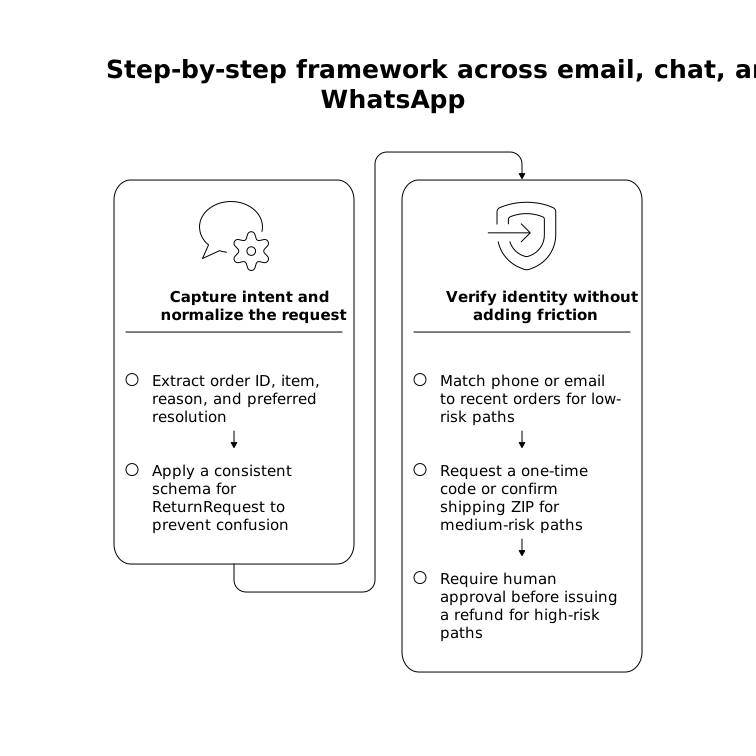
Step 1: Capture intent and normalize the request
Customers rarely say “I request a return under policy section 4.2.” They say: “This doesn’t fit,” “refund pls,” or they forward an old email thread. Your automation needs robust intent capture and input normalization: extract order ID (or match by email/phone), item(s), reason, and preferred resolution (refund vs exchange) while preserving the customer’s original wording for audit.
In practice, this is where many autonomous systems become brittle—different channels produce different payloads. A consistent schema for “ReturnRequest” prevents downstream confusion and reduces errors when tools are invoked. If you build agentic workflows, it’s worth applying the same discipline used to reduce tool-call ambiguity (see canonical schemas and input normalization for a broader security and reliability mindset).
Step 2: Verify identity without adding friction
Identity checks should be proportional. If the customer is signed in to web chat, you may already have high confidence. On WhatsApp, phone number matching may be strong but not perfect. On email, sender address can be spoofed.
- Low-risk path: match phone/email to recent orders and ask a single confirmation question.
- Medium-risk path: request a one-time code or confirm shipping ZIP/postcode.
- High-risk path: require human approval before issuing a refund (but still automate the rest).
Make the check invisible when possible, and explicit when necessary: “To protect your account, I need to confirm the delivery ZIP code.”
Step 3: Apply policy as a decision, not a paragraph
Return policies are often written for humans, not machines. Convert them into decision points with evidence requirements: return window, final sale exclusions, hazardous items, bundled products, and region-specific rules. A good autonomous flow always stores the exact policy decision path taken (“within 30 days,” “item category eligible,” “used condition not indicated”). This keeps customer communications consistent and reduces escalations.
When the policy is unclear or the signals conflict (e.g., delivery date mismatches), route to a human approval while keeping the customer updated that the request is under review.
Step 4: Choose the return method and set expectations
Don’t treat “label generated” as the finish line. It’s the start of a new promise: when the refund will happen and what the customer needs to do next. Offer the return method that fits the order and your operations:
- Ship-back label: send a PDF (email) and a short link (chat/WhatsApp).
- Drop-off QR: ideal for mobile channels like WhatsApp.
- Keep-item refund: only when policy allows and risk is low; still record rationale.
Every method needs a concise expectation message per channel: “Refund is issued 1–3 business days after we receive the return,” plus payment-method caveats.
Step 5: Track progress with events, not check-ins
Customers shouldn’t have to ask, “Any update?” Build event-driven updates that trigger only when something materially changes: label created, first carrier scan, delivered back to warehouse, inspection complete, refund issued. This reduces message volume while increasing trust.
To keep workflows maintainable, structure your automation as reusable branching patterns: one branch per return method and one branch per exception type (lost in transit, partial return, damaged return). If you’ve struggled with sprawling no-code flows, the mental model from branching logic patterns transfers well to returns.
Step 6: Handle exceptions with “partial autonomy”
Autonomous returns fail in predictable ways: missing scans, warehouse delays, mismatched SKUs, and payment processor errors. The fix is not “turn automation off,” but “design partial autonomy.”
- Auto-resolve when evidence is strong (e.g., carrier shows delivered to warehouse).
- Ask one targeted question when evidence is missing (e.g., request a drop-off receipt photo).
- Escalate with a packet: include timeline, events, policy path, and recommended action.
This is also where internal tooling matters: the human shouldn’t re-investigate what the agent already knows. The agent should produce a clean summary and the exact reason it could not proceed.
Step 7: Issue the refund and close the loop in the original channel
“Refund issued” should be based on confirmation from your billing or payment system, not on an internal intention. Once confirmed, send the customer a final message in the channel they used, with three details:
- Amount and method (including store credit vs original payment method).
- Processor timelines (e.g., banks may take several days to post).
- Reference IDs (refund transaction ID, return authorization number).
Then close the case, log resolution metadata, and feed it into evaluation: which steps were autonomous, where humans intervened, and which exceptions are trending.
Making the framework work in the real world
Most teams already have the necessary systems—commerce platform, CRM, ticketing, warehouse, and payments—but they’re fragmented across channels. Typewise fits well when you need an AI-native layer that connects those systems and keeps workflows consistent across email, chat, and WhatsApp, with human approvals where it matters. If you’re exploring an agent platform approach, start by mapping your state model and events, then connect tools incrementally so each new action is observable and reversible.
For a reference point on orchestrating cross-channel actions while keeping business teams in control through natural language instructions and supervised execution, see typewise.app.