
The SEO data gap hiding in plain sight
Search behavior has changed faster than many analytics setups. More queries end on the results page: users get an answer in a featured snippet, a knowledge panel, “People also ask,” a map pack, or an AI-generated summary. The search still happened, your brand may still have helped, but the click never arrives. That creates a quiet measurement problem: traditional website analytics can only “see” sessions that reach your site.
This is the hidden SEO data gap. It shows up as impressions with no clicks, “good rankings” with flat traffic, and content that appears to perform well in Search Console but fails to produce measurable on-site value. The twist is that you can narrow this gap without cookies or user-level tracking—if you connect the right data sources and measure the right outcomes.
What “zero-click” really means for performance tracking
Zero-click search isn’t a single feature. It’s a pattern: the user’s intent is satisfied (or redirected) directly on the SERP. For measurement, that means your KPI can’t be “sessions” alone. You need to separate three layers:
- Visibility: did your page appear for the query (impressions)?
- Engagement opportunity: did the SERP invite a click (CTR)?
- On-site outcomes: if users did click, did the visit lead to a goal (conversions, signups, revenue)?
Featured snippets intensify this. They can drive clicks when the snippet teases the answer, or suppress clicks when it fully resolves the question. The same ranking can mean very different business value depending on how the SERP is composed.
Why you can’t measure zero-click with site analytics alone
Cookie-based and cookie-less analytics share a limitation: neither can log a visit that never happens. If a user reads your snippet and leaves, there is no pageview to count. That’s why “zero-click tracking” is less about inventing a new on-site metric and more about combining:
- Search platform data (impressions, clicks, average position)
- On-site analytics (what visitors do after they arrive)
- Content intent mapping (what the page is supposed to achieve)
When those three are aligned, you can attribute the role of a page even when the click rate is compressed by snippets and SERP features.
The privacy-friendly measurement stack that closes the gap
1) Use Google Search Console as the source of truth for visibility
Search Console is where zero-click becomes measurable. It reports impressions and clicks at the query and page level, which is exactly what you need when sessions are missing. For featured snippet-oriented pages, Search Console lets you watch for patterns like:
- Impressions rising while clicks stay flat
- CTR dropping after a page starts appearing in “answer” formats
- Query mix shifting from exploratory to informational
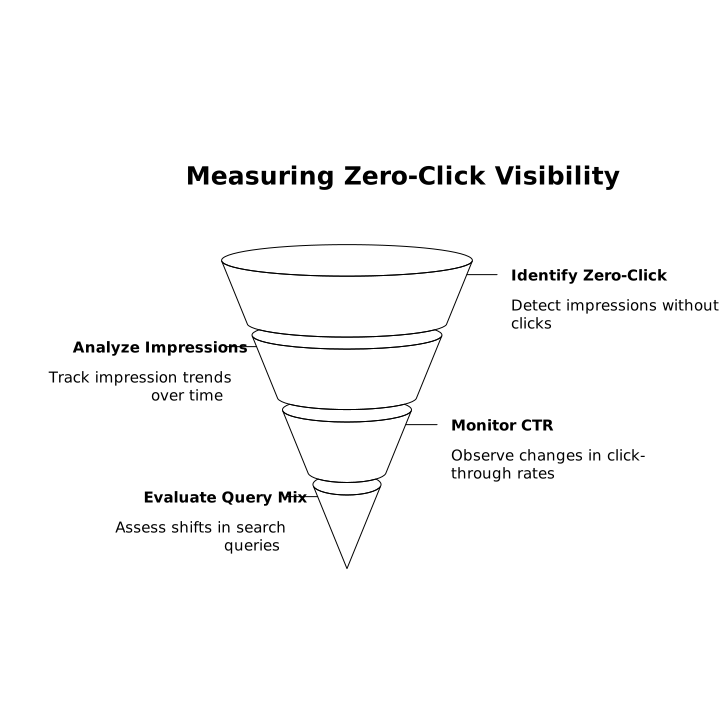
Even without explicit “snippet” labeling for every query, these patterns help you spot where SERP features are changing the relationship between rankings and traffic.
2) Pair it with cookie-less, aggregate site analytics for outcomes
Once a click happens, the question becomes: did the visit accomplish anything? This is where a lightweight, privacy-first tool is useful because it keeps measurement focused on outcomes rather than identity.
Plausible Analytics is built around that approach: no cookies, no personal data, no cross-site identifiers—just aggregated metrics and clear goal tracking in a single dashboard. If your goal is to understand how organic traffic contributes to signups, demos, downloads, or revenue, you can do it without building a user profile. For teams that want a straightforward way to connect search visibility to on-site results, plausible.io is a practical reference point.
3) Track goals that match search intent, not just pageviews
Zero-click doesn’t mean “zero value.” Some pages exist to earn trust and answer questions. Others should drive deeper engagement. To measure correctly, define goals per intent:
- Informational pages: newsletter signups, outbound clicks to product docs, scroll depth, internal navigation to key pages
- Commercial investigation: pricing page views, demo requests, comparison downloads
- Transactional: checkout starts, purchases, lead form completions
When you compare Search Console clicks for a page against its conversion rate, you get a more stable view than traffic alone. A page can “lose” clicks to snippets but still be your highest-assisting asset for conversions when users do choose to visit.
How to evaluate featured snippet performance without invasive tracking
Look for CTR changes at stable positions
A clean way to isolate snippet impact is to monitor periods where average position remains roughly stable while CTR moves significantly. If position stays similar but CTR drops, the SERP likely changed (snippet, AI answer, or richer competitor result). If CTR rises at the same position, your title/meta and snippet content may be doing better at earning the click.
Separate “answer content” from “click-driving content”
Some pages should intentionally satisfy the query quickly. Others should leave room for the next step. That’s not about withholding information; it’s about structuring it:
- Provide a concise definition or steps near the top (snippet-friendly).
- Offer depth that requires a visit to benefit: examples, templates, calculators, downloadable assets.
- Use clear next actions that match the intent (“see the checklist,” “compare options,” “get the template”).
Then measure whether visitors who do click complete those next actions. Goal conversion data is what tells you if the page is merely “visible” or actually “useful.”
Monitor query clusters, not single keywords
Featured snippets can shift between pages and queries frequently. Instead of obsessing over one keyword, group queries by intent (definitions, how-to, comparisons, troubleshooting) and evaluate how each cluster performs:
- Cluster impressions and clicks in Search Console.
- Map cluster landing pages to on-site goals.
- Watch for pages that gain impressions but produce low goal completion—often a sign of mismatched intent.
Practical reporting that connects SERP visibility to business results
A useful zero-click report doesn’t try to “count” non-clicks as visits. It highlights where the business impact might be hiding. A simple monthly view can include:
- Top pages by impressions (Search Console) with CTR trend
- Top pages by organic goal completions (site analytics)
- Pages with high impressions and low clicks that still assist conversions indirectly (often brand-building content)
- Pages with decent clicks but weak outcomes (often need better intent alignment or clearer CTAs)
Because Plausible offers Google Search Console integration for SEO insights and codeless goals, it’s well suited to this style of reporting: you can keep search visibility and on-site outcomes in a privacy-friendly setup without adding cookies or persistent identifiers.
Common pitfalls when measuring zero-click and snippets
Assuming every impression is a missed visit
Many impressions come from queries where the user never intended to click any result. Treat impression growth as brand reach first, then evaluate whether your content type should be optimized for clicks or for authority.
Over-optimizing for the snippet at the expense of conversions
Winning a snippet can be satisfying, but if the page stops helping users take the next step, you can end up with impressive visibility and weaker results. Use goals to keep optimization grounded.
Relying on cookie banners as a measurement strategy
Adding cookies doesn’t solve zero-click. It can increase your on-site data volume, but it won’t capture SERP-only interactions—and it may reduce data quality if more visitors decline tracking. Aggregated, cookie-less analytics plus Search Console tends to be a cleaner fit for SEO realities.
What to do next
If you suspect a zero-click gap, start by identifying your highest-impression pages in Search Console, then match each page to a clear intent and a measurable on-site goal. From there, optimize content structure for both snippet eligibility and post-click usefulness. The aim isn’t to “beat” zero-click—it’s to measure SEO in a way that reflects how search works now, without resorting to cookies or personal tracking.