Why newsletter conversion tracking got harder without cookies
Email is still one of the highest-intent channels you can own, but conversion tracking has changed. Many teams used to rely on third-party cookies, cross-site identifiers, or user-level journeys that stitched together clicks and purchases. In a privacy-first world, those approaches are increasingly unreliable (or simply not appropriate).
The good news is you can still measure newsletter performance clearly using three practical building blocks:
- Link decoration (so you know which email and which link drove the visit)
- Codeless goals (so you can measure signups, leads, and key actions without engineering work)
- Landing-page reporting (so you can see what each email actually achieved on-site)
This approach focuses on aggregated, page-level and event-level outcomes rather than following individuals around the web. It’s also a natural fit for privacy-friendly analytics such as plausible.io.
Step 1: Use link decoration to identify newsletter traffic
“Link decoration” just means adding descriptive parameters to the URLs inside your email. When someone clicks, those parameters travel with the visit and make attribution possible without needing cookies.
Use UTM parameters as the baseline
Most email service providers (ESPs) can auto-tag links, but manual control is usually cleaner. A solid default set is:
- utm_source: the platform, e.g.
newsletteror your ESP name - utm_medium:
email - utm_campaign: the issue or campaign name, e.g.
product-launch-apr-2026 - utm_content (optional): distinguish multiple links/CTAs, e.g.
hero-cta,text-link-1
Example:
https://example.com/pricing?utm_source=newsletter&utm_medium=email&utm_campaign=apr-21-2026&utm_content=hero
Make campaign naming consistent so reporting stays readable
The main failure mode with UTMs is inconsistency. Pick a naming convention and stick to it:
- Use lowercase and hyphens
- Encode the issue date or issue number (so you can compare over time)
- Keep
utm_campaignstable, and varyutm_contentfor link-level tests
This matters because in a cookieless setup you’re leaning more on clean aggregation. If naming is messy, your data becomes hard to trust.
Add a lightweight “newsletter click ID” when you need deeper clarity
UTMs handle most reporting. If you also want to tie performance back to a specific module or template section across multiple issues, you can add one extra parameter such as ref=newsletter or nl_link=footer_pricing. The goal isn’t to identify a person; it’s to label the click context.
Step 2: Track conversions with codeless goals
Once your links are decorated, the next step is defining what “conversion” means for your newsletter. In many programs, you’ll have more than one conversion type:
- Newsletter-to-trial signup
- Newsletter-to-demo request
- Newsletter-to-purchase (or upgrade)
- Newsletter-to-lead magnet download
Codeless goals are ideal here because you can implement conversion tracking using URL patterns or simple interaction rules, without adding custom code to every CTA.
Use a dedicated success page whenever you can
The most robust cookieless conversion setup is a clear “success” URL. Examples:
/thank-you/trial/started/demo/requested
Then your goal becomes: “Visits to this page.” This avoids ambiguity (for example, button clicks that don’t complete submission).
When there’s no success page, use existing site signals
Not every flow ends with a clean URL. In those cases, choose a measurable proxy that still reflects intent, such as:
- A confirmation page view in your app
- A file download event for a lead magnet
- An outbound click (e.g., to a booking tool) if the booking happens off-site
The key is to pick goals that are stable and hard to trigger accidentally. If you later add a true success page, you can refine the goal without changing your entire reporting approach.
Keep your goal list short and decision-oriented
It’s tempting to create goals for everything (scroll depth, time on page, multiple micro-actions). For newsletters, clarity beats quantity. A practical setup is:
- 1–2 primary conversion goals (trial, demo, purchase)
- 1–2 supporting goals (download, key product page reach)
This makes it easier to compare issues, subject lines, and CTAs without drowning in metrics.
Step 3: Use landing-page reporting to connect emails to outcomes
Click-through rate inside your ESP is useful, but it doesn’t tell you what happened after the click. Landing-page reporting closes that gap by showing which pages your newsletter sends people to, and how those sessions convert.
Start with “Which landing pages did each issue drive?”
For each newsletter issue (utm_campaign), review:
- Top landing pages
- Engagement quality signals (e.g., subsequent pageviews, key page reach)
- Goal conversion rate and total conversions
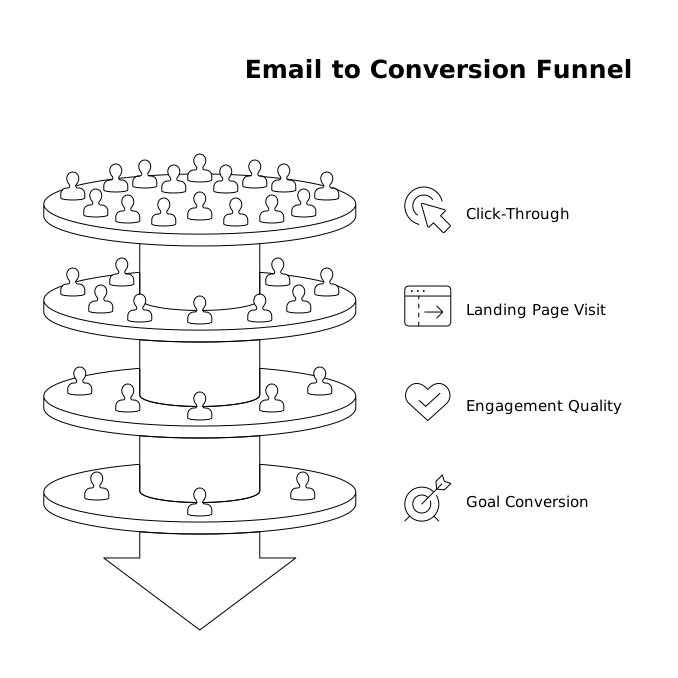
This quickly reveals patterns such as “Issue A drove traffic to a blog post, but Issue B drove traffic to pricing—and converted better.”
Separate landing pages built for email from pages built for search
Email visitors behave differently from search visitors. Consider creating email-specific landing pages that:
- Match the message and promise of the email
- Have a single, obvious next step
- Load fast and avoid unnecessary scripts
You don’t need a new page for every issue. Often one strong, reusable “newsletter offer” page plus a couple of campaign pages is enough.
Compare CTAs using utm_content rather than extra pages
If the only difference is the CTA placement or wording, keep the landing page the same and distinguish links with utm_content. That way you can evaluate:
- Which link position gets clicked most
- Which link drives the highest conversion rate
This is especially helpful when you have multiple CTAs (hero button, inline link, footer link) that all point to the same destination.
Practical cookieless reporting workflows you can run weekly
Workflow A: Newsletter issue scorecard
- Filter to
utm_medium=emailand the latestutm_campaign - Review sessions and top landing pages
- Check primary goals: total conversions and conversion rate
- Note which
utm_contentlabels contributed most
Workflow B: Landing page performance for email traffic
- Filter to email traffic
- Sort landing pages by conversions, not just visits
- Identify pages with high visits but weak conversion and tighten the offer or CTA
Workflow C: Campaign naming audit
- Scan campaign names for duplicates or inconsistent formatting
- Standardize going forward so comparisons are clean
Common pitfalls and how to avoid them
Relying on last-click logic inside the ESP only
ESP reporting often focuses on clicks, not outcomes. Keep ESP data for deliverability and email-level testing, and use on-site analytics for conversions and landing-page effectiveness.
Breaking attribution with redirects and link shorteners
Some redirect chains drop parameters. If you must redirect, test that UTMs survive the full path from inbox click to landing page. Also ensure your canonical URL strategy doesn’t strip parameters before analytics can read them.
Measuring too many “micro conversions”
In a cookieless world, measurement works best when the signal is clear. Focus on outcomes you can act on: leads, signups, purchases, and a small number of supporting indicators.