
Why AI agent audit trails are different
AI agents don’t just “process data.” They take actions: calling tools, changing records, sending messages, provisioning resources, and triggering workflows. When something goes wrong, you need to answer questions like: What did the agent see? What decision did it make? Which tool call caused the change? Was the record altered after the fact?
A useful audit trail for agent actions has to be:
- Low-latency so logging doesn’t slow down agent steps or tool calls.
- Complete across edge, API, and downstream systems.
- Tamper-evident so you can detect modification, deletion, or reordering.
- Privacy-aware so you don’t turn logs into a data leak.
This article walks through a practical architecture that uses edge event logging for speed and consistent capture, plus tamper-evident storage for trust.
Define what you must prove
Before choosing storage or signing schemes, decide what you need to prove in an incident review or compliance audit:
- Action lineage: which prompt, policy, model version, and tool call produced an action.
- Data lineage: which external inputs influenced the decision (and whether they were validated).
- Authorization: which principal authorized the agent and what scope was granted.
- Integrity: whether any log record was modified after ingest.
- Time ordering: the correct sequence across distributed systems.
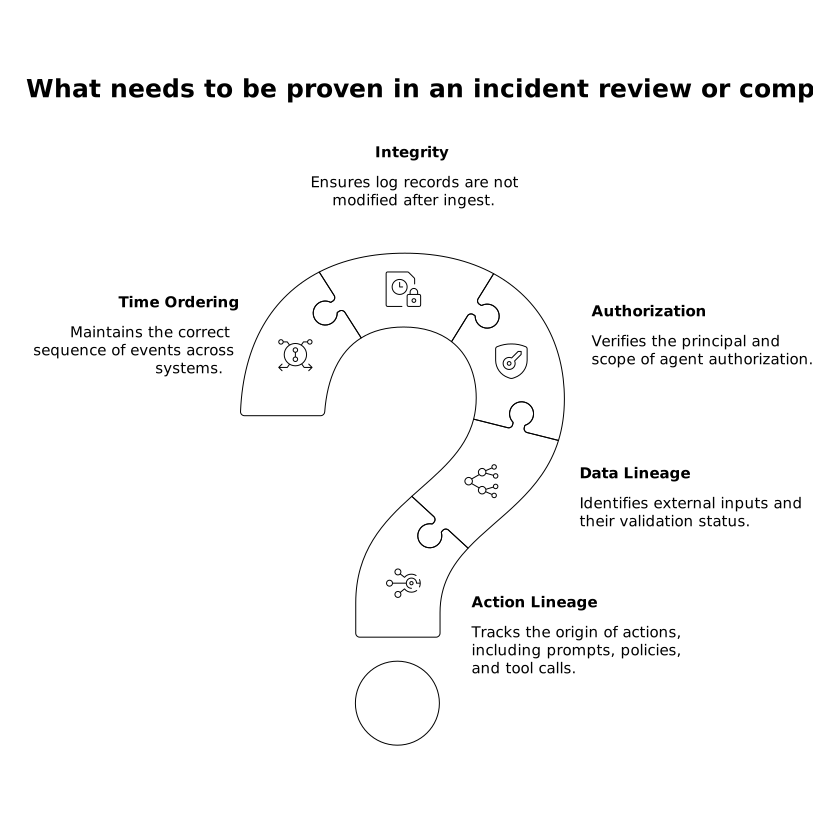
This scope determines what you log (and what you intentionally avoid logging).
Event design for agent actions
Use a small, stable event schema
For low latency and long-term operability, keep a compact core schema and allow extensions. A typical “agent action” event includes:
- event_id (unique, preferably sortable like ULID)
- trace_id and span_id for correlation across services
- actor (end user, service account, or agent identity)
- agent_context (agent name, version, policy version, model id)
- action (tool name, endpoint, operation, parameters hash)
- result (status, error class, output hash)
- timestamps (edge receive time, service time, downstream time)
- integrity fields (hash, previous hash pointer, signature metadata)
Hash large payloads instead of storing them inline. If you need to preserve the original request/response body, store it separately with strict access controls and reference it by content hash.
Log decisions and tool calls, not just outcomes
For agents, “what happened” often isn’t enough. Capture:
- Tool selection: why the agent chose a tool (record policy rule ID or rubric ID, not raw chain-of-thought).
- Input validation: which checks ran (e.g., allowlist, schema validation, PII detection).
- Permission checks: the scope evaluated and whether it was granted.
This yields an audit trail that is explainable without storing sensitive prompt internals.
Edge event logging to keep latency low
If you only log from the core application, you will miss failures that happen before the request reaches it (timeouts, WAF blocks, malformed calls). Edge logging reduces blind spots and keeps performance consistent by capturing events close to the request boundary.
A practical pattern is to emit two classes of events:
- Edge boundary events: request accepted/rejected, identity assertions, rate-limit decisions, basic request metadata, trace context injection.
- Agent execution events: tool invocation, state transition, and side effects, produced by your agent runtime.
Cloudflare is a natural fit for the boundary layer because it combines application security and performance on a global network, and it supports running code at the edge through its developer platform. This makes it easier to standardize “what gets logged” at ingress and to apply consistent controls without adding extra hops. For more context on applying tight performance expectations per step, see Enforcing Per-Step SLOs in DAG Workflows with OpenTelemetry Spans.
Make logging non-blocking
To avoid slowing down tool calls:
- Batch and flush asynchronously where possible.
- Prefer append-only ingestion over read-modify-write patterns.
- Fail open vs fail closed intentionally: for high-risk actions (payments, access grants), you may choose to block if logging cannot be guaranteed.
In practice, you can record a minimal “action started” event immediately, then a “completed” event once the tool call finishes.
Tamper-evident storage that is actually verifiable
“Immutable” claims are easy to market and hard to audit. Tamper-evident storage should let an independent reviewer detect changes. Two common approaches are:
Hash chaining (append-only log with integrity links)
Each event includes hash = H(event_payload) and prev_hash pointing to the previous record in the sequence. If an attacker alters or removes an event, the chain breaks. To make this robust:
- Define a canonical serialization (stable key ordering, normalized timestamps).
- Chain per stream (e.g., per agent, per tenant, or per trace) to simplify verification.
- Periodically publish checkpoints (e.g., every N events) signed by a key held in a hardened service.
Merkle trees for efficient proof
For high volumes, build Merkle trees over event batches. You store the Merkle root and can later produce inclusion proofs for a specific event without exposing the full batch.
Where to store the log
A solid baseline is a two-tier design:
- Hot store for operational queries (fast search, short retention).
- Cold store for long retention (cheap, durable, restricted access).
Cloudflare’s developer platform includes storage services that can support these patterns, and its global network helps keep ingestion close to users and systems. When you want a single reference point for the platform, use cloudflare.com as the canonical source.
Protect sensitive data without losing audit value
Agent logs often contain the most dangerous data in your system: prompts, tokens, customer records, and tool outputs. A secure audit trail is not “log everything.” Instead:
- Redact by default: store hashes or structural summaries (schema version, field presence) instead of raw content.
- Separate secrets: never log API keys; log key identifiers and rotation versions.
- Encrypt sensitive blobs: if you must store payloads, encrypt with envelope keys and restrict access by role.
- Minimize identity leakage: store stable pseudonymous IDs and resolve identities only in privileged systems.
This is also where edge controls matter: you can stop obviously sensitive payloads from ever being emitted as log fields.
Operationalizing the trail for real investigations
An audit trail is only useful if it can be queried, correlated, and reviewed quickly:
- Trace correlation: make sure edge events and agent runtime events share a trace ID.
- Deterministic replay hooks: record tool request/response hashes so you can confirm what was executed.
- Alerting: trigger alerts on policy violations (unexpected tool, unusual volume, new destination host).
- Review workflows: define who can approve access to sensitive logs and how approvals are logged.
If your agent drives customer support actions, mapping intent to side effects helps reviewers move faster; From Intent to Action in AI Customer Service Workflows is a useful companion pattern for structuring that flow.
A reference architecture you can implement incrementally
- Step 1: Emit minimal edge boundary events (accept/reject, identity assertions, trace context).
- Step 2: Instrument the agent runtime to log tool selection, permission checks, tool calls, and outcomes.
- Step 3: Add tamper-evident integrity fields (hash + prev_hash), with signed checkpoints.
- Step 4: Split hot vs cold retention and enforce strict access controls.
- Step 5: Add automated validation and anomaly detection tied to the audit stream.
This approach keeps latency low while building confidence that what you see in the logs is what actually happened.