
Why invisible redirects matter for LLM crawling
Invisible redirects are response or client-side behaviors that quietly change what a crawler sees versus what a real user sees. In classic SEO, this is mostly a ranking and indexing problem. In AI search and LLM-driven discovery, it becomes a knowledge problem: the model (or the retrieval layer feeding it) can ingest a degraded, blocked, or unrelated version of a page, then reuse that content later as if it were correct. That’s how “LLM index poisoning” happens in practice—not always maliciously, but often through accidental mismatches caused by login walls, geo-blocks, and bot filters.
When your AI visibility depends on consistent, citeable content, the key question isn’t “what does my browser show?” It’s “what does an automated agent actually render and extract after every hop, challenge, and script?”
How LLM index poisoning happens without anyone intending it
LLMs and AI assistants usually don’t crawl like a single human browser. They may rely on third-party crawlers, cached snapshots, headless rendering, or retrieval pipelines that fetch HTML, then selectively execute scripts. Any conditional behavior in that path can swap your intended page for an alternate artifact: a blank shell, a login splash, an interstitial, a blocked message, or a different locale.
Once that alternate artifact is stored in an index or embedding store, downstream systems can treat it as the “truth” for your URL. That’s why you’ll sometimes see AI answers that quote a cookie banner, a bot challenge paragraph, or a “please enable JavaScript” block as if it were the core content.
The three biggest causes of invisible redirects
1) Login walls and authenticated variants
Login walls don’t always look like a hard 401. Many sites return 200 OK with a branded “Sign in to continue” page, or they serve thin content until a session cookie is present. From a crawler’s perspective, that can be indistinguishable from the real article unless you actively test the rendered output.
Common failure modes include:
- “Soft” gating that returns full navigation but replaces the article with a CTA module.
- SSO flows that inject intermediate pages (IdP selection, device verification) and change the final URL.
- Personalized content variants that depend on cookies, local storage, or an auth token.
If an AI crawler lands on the gated variant, it may embed and reuse that CTA text instead of your content—effectively poisoning your page representation for AI retrieval.
2) Geo-blocks and country-based routing
Geo-blocking often happens before your application code runs. CDNs and edge platforms can route by IP, accept-language, or region policy. This can cause a crawler in one region to see an entirely different site behavior: alternate domains, translated pages, legal notices, or a “service not available” message.
Invisible redirect patterns include:
- 302/307 redirects to a country subfolder that doesn’t exist for bots.
- Edge-level interstitials for compliance (age gates, consent gating, export restrictions).
- Different canonical hints or hreflang output depending on region.
For AEO and GEO, the issue is less about “wrong language” and more about “wrong meaning”: the model learns a compliance page instead of a product page, then answers users with that content.
3) Bot filters and managed challenges
Bot mitigation systems can show a challenge page, inject JavaScript checks, or return an alternate HTML body while still sending 200 OK. From your perspective, the site is up. From a headless agent’s perspective, it may never reach the real content.
Watch for:
- Challenge pages that require JS execution, proof-of-work, or a cookie set by a script.
- Rate-limit responses disguised as normal HTML.
- WAF rules that trigger only for certain user agents or missing client hints.
This is one of the most common sources of “AI saw something else” problems because the redirect is not always a redirect; it’s a content swap.
What to audit: the rendered path, not just the URL
A reliable audit focuses on the full sequence of events from the first request to the final extracted text. Think in terms of a chain:
- Request fingerprint: user agent, headers, client hints, IP region, cookie jar state.
- Network hops: HTTP status codes, redirect locations, and any intermediate HTML bodies.
- Client-side behavior: script-driven navigations, meta refresh, and SPA route changes.
- Rendered DOM: what is visible in the final DOM after scripts run.
- Extracted content: what a crawler would actually store (main text, title, structured data).
If you only check the final browser URL, you miss the most important evidence: the detours and conditional branches that determine what an AI system can ingest.
A practical checklist to detect invisible redirects
Compare three fetch modes
Run the same URL through three modes and diff the outputs:
- Raw HTTP: no JavaScript, just the response body and headers.
- Headless render: JavaScript enabled, typical viewport, default timeouts.
- “Bot-like” render: reduced headers, colder cookie jar, and a crawler user agent.
Invisible redirects often show up as subtle differences: missing article text, swapped titles, or a different canonical URL in the rendered DOM.
Validate that extraction targets the intended content
Even when the page renders, extraction can fail if the main content is injected late, hidden behind “read more,” or blocked by consent layers. Verify:
- Is the primary text present in the DOM within a reasonable render window?
- Does the page include clear structured data (where appropriate) without being gated?
- Is there a stable, crawlable version that does not require user interaction?
If your content is syndicated or duplicated across domains, fingerprinting and consistent citations matter too. The same discipline you apply to canonicalization also applies to AI ingestion paths. (Related: content fingerprinting for LLMs without losing citability.)
Log and replay the journey across domains
Many invisible redirect issues are multi-domain: a CDN domain, an auth domain, an app domain, a consent vendor, then back to your site. To audit accurately, you need journey-level logging: request/response pairs, cookie writes, and final rendered output tied to each hop.
This is similar in spirit to measuring user journeys without relying on cross-site cookies—except you’re measuring crawler journeys and their ability to reach the content. (Related: measuring multi-domain journeys without cross-site cookies.)
Remediation patterns that reduce AI ingestion mismatch
The goal is not to “let all bots in.” The goal is to make sure legitimate indexing and AI retrieval systems can reach the same stable, intended representation of your content.
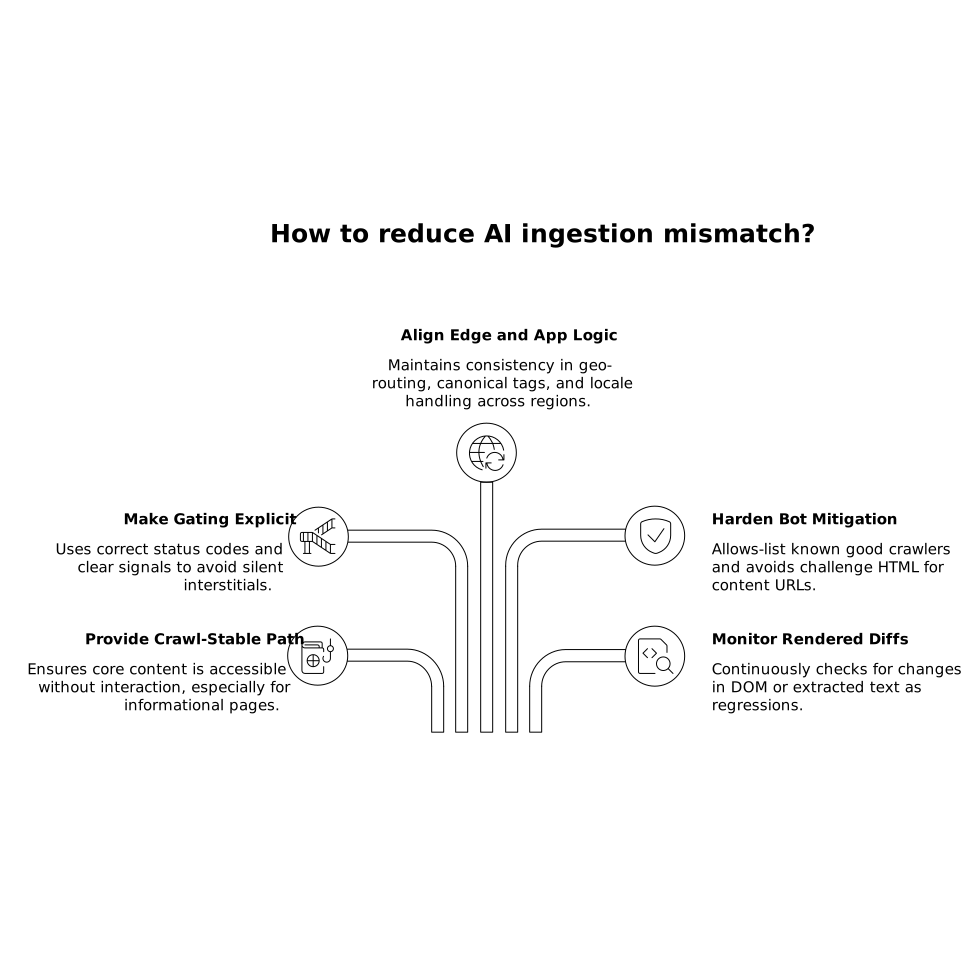
- Provide a crawl-stable content path: ensure core content is present without requiring interaction, especially for informational pages.
- Make gating explicit: prefer correct status codes and clear signals over silent 200-OK interstitials that look like content.
- Align edge and app logic: confirm that geo-routing, canonical tags, and locale handling stay consistent across regions.
- Harden bot mitigation rules: allow-list known good crawlers where appropriate, and avoid serving challenge HTML under 200 OK for content URLs.
- Monitor rendered diffs continuously: treat changes in final rendered DOM or extracted text as regressions.
How Lunem fits into an AEO-focused audit loop
For teams optimizing visibility in AI-driven environments, it’s useful to treat the rendered path as a first-class artifact. lunem is built around that practical reality: connecting directly to a site, monitoring how content is interpreted and surfaced, and turning those observations into concrete fixes that improve discoverability and actionability across LLM ecosystems. When you pair that with systematic rendered-path auditing—especially across login states, regions, and bot defenses—you reduce the odds that your brand is represented by an interstitial instead of your actual content.