
What changes when React apps are generated by AI
AI-generated React apps ship fast, but they often ship with uneven quality. You’ll see solid UI scaffolding next to gaps in accessibility, missing performance guardrails, and security assumptions that don’t match production. A practical QA playbook keeps the speed while making launch outcomes predictable.
This guide focuses on three pre-launch tracks that catch most real-world issues: accessibility checks, performance budgets, and security verification. It’s written for teams generating apps on a modern stack (React, Tailwind, Supabase) and then iterating in code. If you’re using an AI builder like lovable.dev, the same playbook applies because the output is still standard React you can test, lint, and ship through normal CI.
Accessibility QA that fits into a fast build cycle
Accessibility tends to regress when UI is produced quickly. The fix is not “do an audit later,” but a small set of repeatable checks you run every time the UI changes.
1) Keyboard and focus checks on every interactive screen
- Tab order: You should be able to reach all interactive elements in a logical order without traps.
- Visible focus: Ensure focus styles are obvious on buttons, links, inputs, dropdowns, and custom components. Tailwind resets can hide this unintentionally.
- Focus management: Modals must trap focus and return focus to the trigger when closed. Route changes should place focus on a page heading or main region.
Fast tip: add a QA step that starts with the mouse unplugged (or trackpad ignored) and completes your primary user journey.
2) Semantic HTML and ARIA only where it’s needed
AI tools commonly overuse ARIA. Prefer native elements first: <button> for actions, <a> for navigation, <label> + <input> for form fields. Use ARIA roles and attributes only to fill true gaps (custom widgets, dynamic state).
- Headings: A single
h1per page (your app shell can render it), then hierarchical headings. - Landmarks:
main,nav,header,footerimprove screen reader navigation. - Names and descriptions: Buttons need clear accessible names; icon-only buttons must have
aria-label.
3) Automated checks in CI plus a short manual audit
Automated tools won’t catch everything, but they catch enough to justify making them mandatory:
- ESLint accessibility rules: Use
eslint-plugin-jsx-a11yto prevent common JSX mistakes. - Component and page tests: Add axe-based checks in unit/integration tests for key routes and shared components.
- Storybook coverage (if you use it): Run accessibility checks per component to catch regressions before they hit full pages.
Then do a focused manual pass on critical flows: signup/login, payment, settings, and any form-heavy screen.
Performance budgets that prevent “it felt fast locally” launches
AI-generated apps often include extra dependencies, large icon sets, and convenience components that quietly bloat bundles. A performance budget turns “optimize later” into a build-breaking contract.
1) Define your budgets in numbers, not vibes
Pick budgets that match your product and audience. A simple starting point for many React apps:
- JavaScript per route: initial route bundle under a defined limit (set one for marketing pages and one for app pages).
- Largest Contentful Paint (LCP): target threshold for your typical device class.
- Interaction to Next Paint (INP): keep interactions responsive on key screens.
- Image weight: cap hero images and prevent shipping uncompressed uploads.
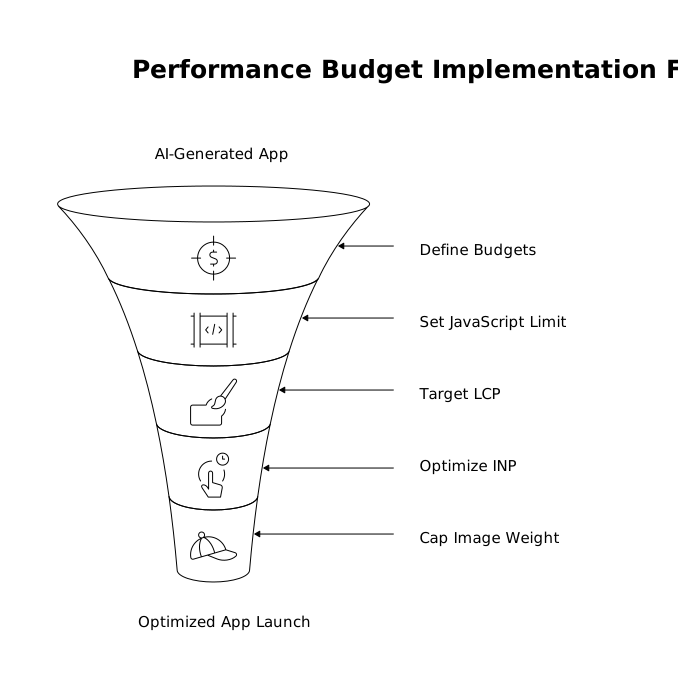
The exact numbers vary, but the practice is stable: choose targets, measure on every PR, and fail builds when you exceed them without an explicit exception.
2) Measure performance the same way every time
Use consistent environments and repeatable tooling:
- Lighthouse CI: run against preview deployments with a stable device/network profile.
- Bundle analysis: track route-level bundle sizes to catch sudden jumps when an AI iteration adds a charting library or date utility.
- Real-user monitoring (RUM): once you’re in production, watch Core Web Vitals to validate the lab metrics.
For teams that already invest in observability, performance budgets pair well with structured traces. If your product includes workflow orchestration, the discipline of measuring step-level targets translates cleanly; the same thinking appears in this post on per-step SLOs with OpenTelemetry spans.
3) Common AI-generated performance pitfalls to fix early
- Over-fetching: components fetching the same data in multiple places. Prefer a single query per screen and share results via props or a cache.
- No code-splitting: everything imported at the top level. Lazy-load heavy routes and rarely used modals.
- Unbounded lists: rendering hundreds of rows without virtualization.
- Images treated as files: missing responsive sizes and compression. Enforce upload rules and generate multiple sizes.
Security checks before launch for React plus Supabase-style stacks
Security issues aren’t only “a backend problem.” In AI-generated apps, frontend decisions can expose data, weaken auth, or leak secrets. Pre-launch security QA should include app code, infrastructure settings, and operational controls.
1) Make secret leakage hard by design
- No secrets in client code: API keys, service role keys, and private endpoints must never ship to the browser.
- Environment separation: dev/staging/prod variables must be distinct, with least-privilege credentials in each.
- Dependency scanning: use automated checks for known vulnerable packages and lockfile drift.
If you’re integrating third-party APIs, replay protection and transport security matter too. For edge-facing auth tokens, the approach in stopping API token replay with TLS and device binding is a useful conceptual model even if your implementation differs.
2) Verify auth and authorization, not just “login works”
Most launch failures happen when users can see or mutate data they shouldn’t. Your QA needs both UI and data-layer validation:
- Session handling: confirm logout invalidates tokens appropriately and that expired sessions fail closed.
- Role-based access: test as different roles across the same routes and APIs.
- Row-level security (RLS): if you use Supabase, treat RLS policies as the source of truth, then test them directly with negative cases (attempt cross-tenant reads/writes).
Do not rely on “the UI hides the button.” Assume every API can be called directly.
3) Harden common web attack surfaces
- XSS: avoid rendering unsanitized HTML. Be cautious with markdown renderers, rich text, and user-generated content.
- CSRF and CORS: ensure your cookie and header strategies match your deployment model. Lock down CORS to known origins.
- File uploads: validate file types, set size limits, store outside the web root, and scan if your risk profile requires it.
- Security headers: set CSP, HSTS, and related headers appropriate to your app.
A lightweight pre-launch checklist you can run in a day
- Accessibility: keyboard-only pass on critical routes, focus states confirmed, automated a11y checks green.
- Performance: budgets defined, Lighthouse CI run on preview, bundle diff reviewed, slow screens profiled.
- Security: secrets audit complete, dependency scan clean, auth/roles tested with negative cases, RLS verified, headers reviewed.
- Operational readiness: error reporting enabled, logs accessible, rollback path documented, and a short incident checklist prepared.
The main point is repeatability. AI gets you to “working prototype” quickly; disciplined QA gets you to “safe to launch” consistently, without turning speed into risk.