
Why “intent” is the easy part
Most customer-service AI projects get stuck in a familiar place: the assistant can classify an intent (“refund,” “change address,” “invoice question”), but it can’t safely complete the work. The gap is rarely model accuracy. It’s workflow design—how you move from a user’s request to validated data, compliant decisions, auditable actions, and a clean handoff when automation should stop.
In modern support stacks, “action” typically spans dozens of systems: CRM notes, order data in commerce platforms, billing adjustments, identity checks, policy lookups, and communications across chat, email, and messaging. When you add 200+ integrations, the workflow becomes a governance problem as much as a product problem.
This article lays out a practical framework for building safe, auditable AI customer-service workflows: a set of building blocks you can apply whether you’re automating returns, renewals, address changes, cancellations, or charge disputes.
A practical framework: Intent, Evidence, Plan, Action, Proof
To move from “intent” to “action” without losing control, design workflows as five explicit phases. Some tickets will skip phases; many will loop. The key is to make the phases visible in your workflow tool and logs.
1) Intent: label the job to be done, not just the topic
Intent classification should capture the goal and the business context. “Refund” isn’t enough—was the item delivered, is it within the return window, is it a subscription renewal, is it B2B with different terms, is it high-risk fraud?
Implementation tips:
- Use a small, stable set of top-level intents (10–30), then attach attributes (channel, region, account type, order status) as structured fields.
- Always bind intent to a case record (ticket ID, conversation ID) so every later action can be traced.
- Track “unknown/other” as a first-class intent; it’s a signal your taxonomy or routing needs work.
2) Evidence: gather inputs with explicit source boundaries
Before the AI proposes actions, it should collect and validate the minimum evidence required. Evidence includes customer statements, account identifiers, order numbers, policy constraints, and system-of-record fields.
Design evidence gathering as a checklist with source types:
- User-provided: what the customer claims (often incomplete, sometimes incorrect).
- System-of-record: CRM, ERP, billing, commerce, ITSM.
- Policy and knowledge: internal policies, shipping rules, warranty terms, compliance guidelines.
Two safety rules matter here:
- Never treat user-provided data as authoritative for high-impact actions (refunds, address changes, cancellations). Verify against a system-of-record.
- Keep evidence immutable: store snapshots or references (record IDs, timestamps, fields read) so you can reconstruct what the AI saw later.
3) Plan: produce a step-by-step proposal that can be reviewed
Planning is where you convert evidence into a deterministic sequence: checks, calculations, and the actions to execute. A good plan is readable by non-engineers and testable by your team.
Plan outputs should include:
- Preconditions (what must be true to proceed), e.g., “Order delivered,” “Within 30-day window,” “Payment method supports partial refund.”
- Decision points with alternatives, e.g., “If return window expired, offer store credit.”
- Risk level and required approvals.
- Proposed actions including which system, which object, and which fields change.
Workflow maintainability becomes critical as you scale across integrations. If your logic becomes a maze, adopt repeatable branching patterns and naming conventions (for example, stable decision nodes and reusable subflows) so business users can evolve workflows without breaking them. For a deeper set of patterns, see Branching Logic Patterns to Keep No-Code Workflows Maintainable.
4) Action: execute through controlled tools, not freeform model behavior
“Action” should mean tool calls into approved integrations with guardrails—not the model improvising. The safe pattern is: the AI proposes, the workflow enforces, the tools execute.
Core controls to include:
- Allowlisted actions: only specific operations are permitted (e.g., “create refund,” “update address,” “cancel subscription”), each with typed parameters.
- Field-level constraints: cap refund amounts, restrict address changes to verified accounts, prevent edits to protected fields.
- Idempotency and retries: every write should be idempotent (or protected by idempotency keys) to avoid double refunds and duplicate updates.
- Human approvals: route to a human when risk is high, confidence is low, or policy is ambiguous.
In platforms built for this style of orchestration, actions are executed via an auditable layer that sits above existing systems. Typewise, for example, is designed for customer-service teams to connect channels, policies, and actions across 200+ deep integrations and additional connectors via the Model Context Protocol, while still controlling which actions are allowed and when humans must approve. You can explore the approach at typewise.app.
5) Proof: produce an audit trail that answers “who did what, when, and why”
Auditable workflows don’t just log text. They log decisions and system effects. Your audit trail should allow you to reconstruct the full chain from intent to outcomes:
- Inputs: evidence references, policy versions, user messages, system fields read.
- Decisions: which rule fired, which alternative was selected, confidence and risk scores.
- Actions: tool calls, payloads (or redacted payloads), timestamps, responses, and resulting record IDs.
- Outcome: customer message sent, ticket status, refund ID, subscription state, follow-up tasks created.
If you operate workflow graphs (DAGs) with multiple steps and integrations, align auditability with observability: emit per-step traces/spans so you can spot bottlenecks, timeouts, and silent failures. A helpful model is to treat every workflow step as an SLO-owned unit and instrument it accordingly, similar to the ideas in Enforcing Per-Step SLOs in DAG Workflows with OpenTelemetry Spans.
Safety patterns that matter at 200+ integrations
Use “policy as a dependency” with versioning
Policies change. If your AI answers based on a living knowledge base, you need to capture which policy version or snapshot was used for each decision. This reduces disputes and improves reproducibility when you evaluate regressions after updates.
Separate “read” permissions from “write” permissions
Many safe automations start as read-only: gather evidence, draft responses, recommend actions. Only later do you enable writes for a subset of intents and a subset of customers. Keep those permissions distinct, and roll out write access with explicit scope.
Design for escalation as a first-class workflow outcome
A “human-in-the-loop” is not an exception; it’s part of the system. Define:
- Escalation triggers (risk, missing evidence, customer sentiment, compliance flags).
- What context gets passed (plan, evidence, proposed actions, and what’s already been done).
- How the workflow resumes after approval or manual completion.
Prevent duplicate actions and cross-system drift
Across CRM, commerce, and billing, drift happens when one system is updated and another isn’t. Require reconciliation checks after writes: confirm the new status, attach the resulting IDs to the case, and notify when the post-condition fails.
How to validate workflows before they go live
Safe automation depends on pre-deployment validation, not just live monitoring. A practical rollout sequence looks like:
- Simulation: run historical tickets through the workflow and compare recommended actions with actual outcomes.
- Shadow mode: let the AI plan and draft, but don’t execute writes; measure accuracy and escalation rates.
- Limited writes: enable writes for low-risk intents (e.g., status updates) and a small customer cohort.
- Continuous evaluation: sample conversations weekly, track policy violations, and monitor integration errors by step.
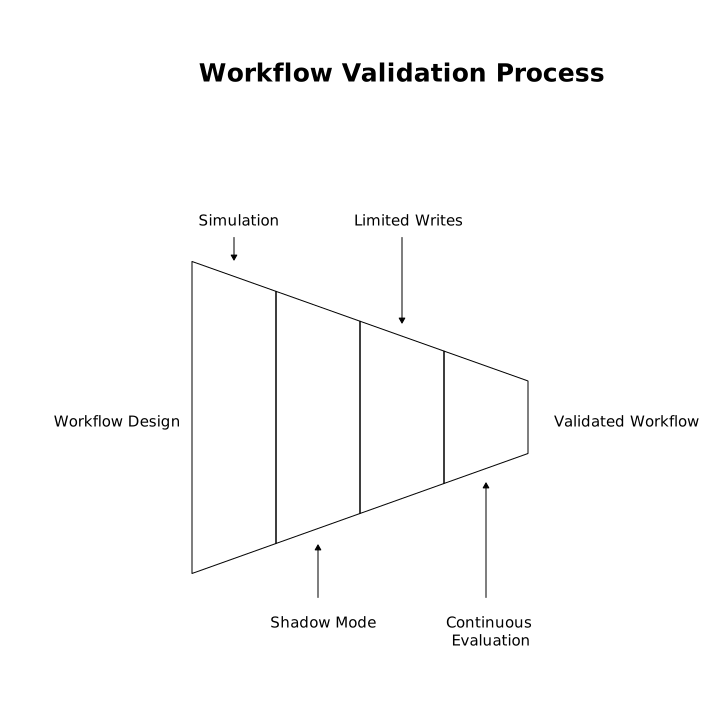
The goal is operational confidence: you should know which intents are safe to automate end-to-end, which require approvals, and which should remain assistive.
What “good” looks like in day-to-day operations
When this framework is working, support leaders can answer practical questions quickly:
- Which intents are fully automated vs. approval-gated?
- Where do workflows fail—evidence collection, policy decisions, tool execution, or customer communication?
- Which integrations create the most friction, and what are the top recurring root causes?
- What changed after the last workflow update, and can we reproduce any regressions?
That visibility is the real payoff. Intent detection is helpful, but auditable action is what makes AI a reliable part of customer service.