
Why calendar-to-transcript governance matters now
Most meeting governance breaks for a simple reason: the rules live in policy docs, while meetings live in calendars, video calls, transcripts, and downstream systems like CRMs and ticketing tools. The result is inconsistent recording, messy consent practices, and “forever transcripts” that quietly become liabilities.
Calendar-to-transcript governance fixes this by turning each meeting into a governed object from the moment it is scheduled through the moment its notes are summarized, shared, redacted, retained, or deleted. The practical goal is straightforward: automatically label meetings by risk level, then apply the right recording, redaction, and retention rules without relying on humans to remember them.
Define risk levels that map to real-world meeting types
Start with a small taxonomy that people can understand and that systems can enforce. Three or four tiers is usually enough:
- Low risk: internal status updates, routine customer check-ins without sensitive topics.
- Moderate risk: sales calls that may include pricing, contracts, or operational details.
- High risk: HR topics, performance, legal discussions, incident response, security reviews, M&A planning.
- Restricted (optional): highly regulated data or special handling requirements (e.g., patient-related workflows, sensitive investigations).
The labels should not be moral judgments. They are routing keys for governance controls: what can be recorded, what must be redacted, who can access artifacts, and how long data should exist.
Auto-label meetings before the call starts
The calendar event is your best early signal because it exists before any audio is captured. Build a labeling pipeline that evaluates each invite as it’s created or updated.
Signals that work well
- Organizer and attendees: HR partners, legal counsel, security team members, or external domains can raise the risk.
- Keywords in title and description: “termination,” “offer,” “complaint,” “breach,” “contract redlines,” “subpoena,” “incident,” “PHI,” “risk review.”
- Meeting template: standardized meeting types (e.g., “Quarterly Business Review,” “Performance Review,” “Incident Postmortem”) should set the default risk.
- Location/platform: different platforms may support different controls, so the meeting tool can influence policy routing.
- Linked records: a CRM deal stage, a support escalation tag, or a security ticket priority can adjust the label.
Two-stage labeling prevents false confidence
Use a pre-meeting label (from calendar signals) as the default policy, then allow a post-meeting adjustment after transcription based on what was actually discussed. For example, a “customer sync” may become high risk if the transcript contains medical identifiers or security credentials. The key is that the default controls still apply during the meeting, when it matters most.
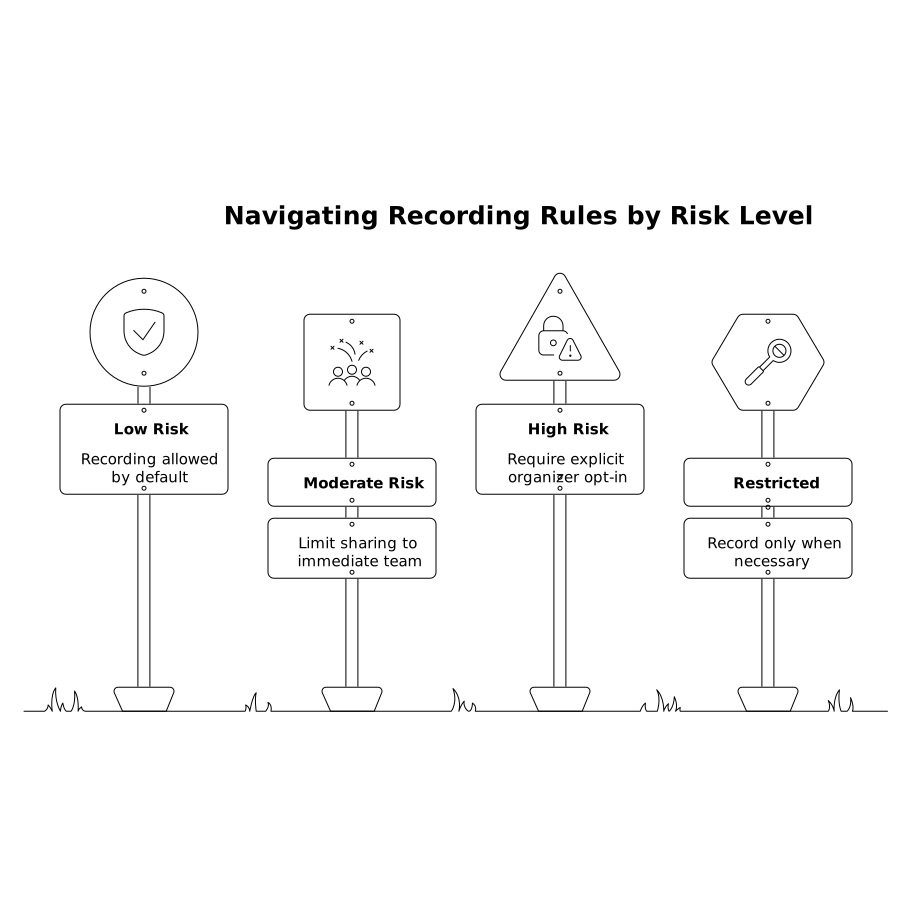
Apply the right recording rules by risk level
Recording isn’t “on/off.” Your policy can define when recording is allowed, how consent is handled, and what happens if the meeting shifts into sensitive territory.
- Low risk: recording allowed by default, standard consent/notification, broad internal discoverability.
- Moderate risk: recording allowed, but limit sharing to the immediate team; require explicit attendees list (no “anyone with link”).
- High risk: recording may require explicit organizer opt-in or an approved template; restrict access to a named group; disable public links and external sharing.
- Restricted: record only when necessary; consider transcript-only without audio storage, or a “no recording” default with exception workflow.
Tools like Fathom fit well in this model because they sit close to the meeting experience (recording and transcription) and can produce structured outputs—summaries, action items, and searchable transcripts—that you can govern consistently.
Redaction rules should follow the data, not the document
Redaction is often treated as a manual clean-up step. In practice, it needs to be automated and repeatable, because meeting outputs get copied into many places: internal docs, Slack threads, CRM notes, project trackers, and coaching libraries.
What to redact automatically
- Personal identifiers: phone numbers, home addresses, government IDs.
- Credentials and secrets: API keys, passwords, private URLs, tokens.
- Regulated data markers: patient identifiers, financial account numbers, or fields your compliance team defines.
- Highly sensitive HR content: health details, protected class references, investigative notes (depending on jurisdiction and policy).
For moderate/high-risk meetings, use “redact by default” on the transcript before it is shared. Keep an immutable original only if your policy requires it, and lock it behind stricter access controls with audit logs.
Redaction should be event-driven
Instead of redacting only once, treat redaction as a service that runs whenever data moves. If a transcript is pushed into a CRM, the CRM-bound version can be more aggressively redacted than the internal coaching version. This is similar to how teams enforce step-by-step reliability in workflows; the same thinking applies to governance automation. (If you’re building complex automations, the patterns in branching logic patterns for maintainable no-code workflows are directly relevant.)
Retention rules that won’t be ignored
Retention is where governance succeeds or fails. If meeting artifacts are useful, teams will keep them. Your job is to make “keeping them” safe by default and time-bounded by policy.
A practical retention matrix
- Low risk: keep transcript and summary for a standard period (e.g., 6–12 months), then auto-delete; allow extensions for knowledge-base value.
- Moderate risk: shorter default (e.g., 90–180 days), with case-by-case extensions for active deals or customer commitments.
- High risk: minimum necessary retention; prefer 30–90 days unless legal hold applies; stronger deletion verification.
- Restricted: shortest feasible retention; in some orgs, only the summary is retained, not full verbatim transcripts.
Because meeting notes commonly sync into other systems, retention must include downstream deletion. If you delete a transcript in the notetaker but it lives forever in a CRM note field, the policy didn’t work—it just moved the risk.
Access controls and sharing defaults for transcripts and clips
Transcripts, highlight clips, playlists, and “global search” features are extremely valuable, but they can also create unintended exposure if high-risk meetings are searchable by the broader organization.
- Default private for moderate+ risk meetings; share by explicit group.
- Role-based access: managers may access coaching views, while HR/legal meetings remain restricted.
- Auditability: log who accessed transcripts, exported clips, or shared summaries.
When using a meeting partner like Fathom, treat features like searchable transcripts and “Ask” experiences as governed surfaces. The same risk label should control search visibility and export permissions, not just storage duration.
Implementation blueprint from calendar to enforcement
1) Label at scheduling time
Use calendar metadata and templates to assign a default label. Store it as an event property or in a governance service keyed by meeting ID.
2) Enforce during the meeting
Use the label to decide whether recording starts automatically, whether organizer approval is required, and what consent messaging appears.
3) Classify and redact after transcription
Run a post-meeting scan for sensitive entities and topic signals. If the risk changes, re-apply policies immediately (tighten sharing, redact, shorten retention).
4) Sync only the right output to downstream tools
Push summaries and action items broadly, but restrict full transcripts for higher-risk meetings. Keep the CRM version minimal and policy-compliant.
5) Automate retention and deletion across systems
Schedule deletion jobs, handle legal holds, and propagate deletions to synced destinations. Governance is only real when deletion is routine, verified, and consistent.
What “good” looks like in day-to-day use
In a mature setup, employees don’t think about governance on every call. They book meetings using templates, the system labels risk automatically, and the right behavior happens: sensitive meetings are recorded only when appropriate, transcripts are redacted before sharing, and data disappears on schedule unless there’s a legitimate reason to keep it. You still get the productivity benefits—instant summaries, follow-ups, searchable history—without turning your meeting archive into an unbounded compliance problem.