
The Feedback Consensus Gap and why it matters
Most product teams know how to measure volume: how many upvotes a feature has, how many tickets mention it, or how many customers asked for it this quarter. What’s harder to see is whether your internal team actually agrees on what that feedback means.
The Feedback Consensus Gap is a practical way to quantify internal disagreement on feature requests before it quietly bends prioritization. It captures the distance between what different roles (PM, Support, Sales, CS, Engineering, Design, Solutions, Leadership) believe about a request: who it’s for, how urgent it is, what problem it solves, and what it will cost.
When this gap stays invisible, roadmaps drift toward the loudest interpretation. When it’s measured, you can resolve misalignment early with targeted clarification instead of broad “alignment meetings.”
What creates a consensus gap in the first place
Same request, different mental model
“Add SSO,” “export to CSV,” or “improve permissions” can sound like a single item. In reality, each group is picturing a different user and a different pain level. Support often sees acute friction, Sales sees deal risk, Engineering sees complexity and dependencies, and CS sees retention impact. None of these views are wrong—they’re incomplete on their own.
Feedback is captured in different places
Requests arrive through calls, tickets, Slack, sales notes, and community threads. If they’re not centralized and deduplicated, teams debate multiple versions of the same idea. That inflates urgency and hides disagreement because people think they’re discussing one shared artifact when they’re not.
A method to quantify internal disagreement on feature requests
The goal is simple: give each feature request a numeric “disagreement score” so you can spot which items need clarification before you commit them to a roadmap.
Step 1: Define the dimensions everyone will score
Pick 4–6 dimensions that represent how your organization makes decisions. Keep them stable over time. A clean set looks like:
- User pain severity (how painful is the current workaround?)
- Reach (how many customers/users are affected?)
- Revenue or retention impact (does it protect or grow revenue?)
- Strategic fit (does it support the product direction?)
- Delivery effort (engineering/design complexity)
- Urgency (is there a deadline, compliance driver, or escalating risk?)
Write one sentence for each dimension so people score the same thing. The point isn’t perfect precision—it’s consistent interpretation.
Step 2: Use a simple scoring scale
A 1–5 scale is usually enough. Avoid 1–10 unless your team is already calibrated. Include short labels (e.g., 1 = low, 3 = medium, 5 = high). The smaller scale reduces “false accuracy” and makes disagreement easier to see.
Step 3: Collect scores from a balanced set of roles
For each feature request, gather scores from at least 4–8 people across roles. If only PM and Engineering score, you’ll miss the most common misalignments. A lightweight pattern is:
- 1 PM (owner)
- 1 Engineering lead
- 1 Support lead
- 1 Sales or Solutions rep
- 1 CS lead (optional but valuable)
- 1 Design lead when UX scope is significant
Keep scoring asynchronous to reduce groupthink. People should score independently first, then discuss only the items with the biggest gap.
Step 4: Calculate the Feedback Consensus Gap score
You can quantify disagreement with a simple dispersion metric. Two options that are easy to run in a spreadsheet:
- Average standard deviation across dimensions: compute the standard deviation of scores per dimension, then average them.
- Range-based gap: for each dimension, compute (max score − min score), then average across dimensions.
The standard deviation approach is smoother. The range approach is simpler to explain. Either works if you apply it consistently.
Also record a direction: is disagreement mainly about impact (pain/reach/revenue) or about cost (effort/risk)? That distinction changes what you do next.
Step 5: Set thresholds and a workflow
Assign simple bands, for example:
- Low gap: ship/plan normally
- Medium gap: add one clarification step before committing
- High gap: do not roadmap yet—run a targeted discovery loop
This is where teams often improve their roadmap discipline without adding bureaucracy: you only pay the “alignment cost” for the items that prove they need it.
What to do when a feature has a high consensus gap
Run a clarification loop, not a debate
High disagreement usually means missing context, not bad judgment. Resolve it by gathering evidence that answers the exact dimension in dispute.
- If impact is disputed: segment the customers requesting it, quantify how often it appears, and capture the underlying job-to-be-done.
- If effort is disputed: do a short technical spike, dependency check, or design exploration that reduces uncertainty.
- If urgency is disputed: identify deadlines, contract clauses, compliance requirements, or churn risk signals.
A useful complement is a structured review of support signals. If you already convert tickets into root causes and themes, you can reuse that approach to bring shared evidence into the scoring conversation. The workflow in this support ticket root-cause heatmap method is a good model for turning qualitative noise into a decision-ready map.
Split “one request” into the variants people are imagining
Some items score high-gap because they’re actually multiple features. “Permissions” may include role templates, object-level controls, audit logs, and admin UX. If roles are scoring different variants, consensus will never converge. Break the request into smaller, testable slices and re-score.
How to operationalize the method in a feedback platform
The method works in any spreadsheet, but it becomes much easier when feedback is centralized, deduplicated, and linked to customers and segments. A platform like canny.io is designed for this: teams can collect requests from multiple sources, group duplicates, and keep context attached to the request rather than scattered across tools.
Once you have a clean “single request artifact,” the scoring exercise becomes faster and more reliable. Internal disagreement drops simply because everyone is looking at the same summary, the same customer evidence, and the same discussion history.
Make the gap visible where decisions happen
Two practical tips:
- Show the gap score next to priority so stakeholders understand why a seemingly popular item isn’t immediately on the roadmap.
- Track the gap over time. If a request’s gap remains high after clarification, treat that as a signal: either the request is underspecified or it’s strategically contentious and needs a leadership call.
Common pitfalls and how to avoid them
Turning scoring into performance theater
If people feel they’re being “graded,” they’ll score defensively. Keep the purpose explicit: the score is about uncertainty and alignment, not about who’s right.
Letting a high-gap item sneak onto the roadmap anyway
This is the classic failure mode: the team senses disagreement but commits due to pressure. The fix is procedural: if the gap is above threshold, the default action is a short discovery step, not a bigger meeting.
Overweighting the loudest channel
Sales escalation and executive requests can be important, but they shouldn’t bypass the gap check. The gap method is most valuable when it protects the roadmap from momentum-based decisions.
A simple way to start this week
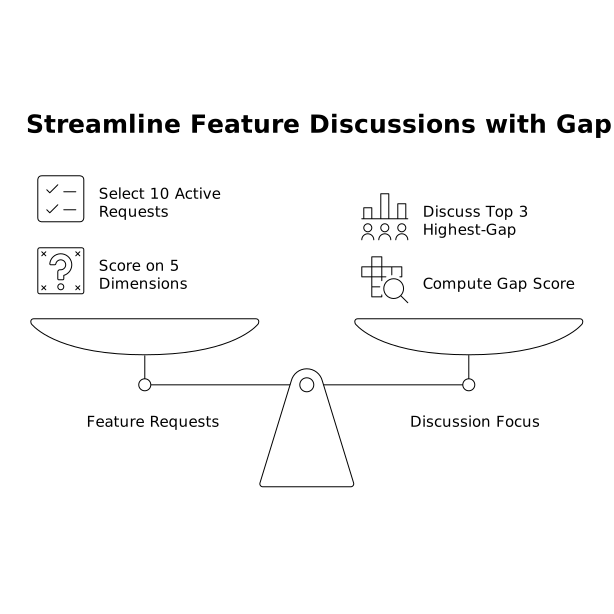
- Pick 10 active feature requests.
- Score them on 5 dimensions with 6 people across roles.
- Compute a gap score (range or standard deviation).
- Only discuss the top 3 highest-gap items.
You’ll quickly see which “obvious priorities” are actually bundles of assumptions—and which items are genuinely aligned and safe to plan.