
The follow-up that looks helpful can still look risky
In sales and outreach, the first follow-up often feels like good hygiene: you’re staying on top of the thread, keeping momentum, and giving the recipient a second chance to respond. The problem is that mailbox providers don’t judge intent. Gmail and Microsoft 365 mostly judge patterns.
When your very first follow-up is sent too soon, or structured in a way that resembles automated chasing, it can create negative deliverability signals. Those signals don’t always show up as a “hard bounce” or an obvious spam complaint. Instead, you may see subtle inbox placement erosion: more messages landing in Promotions, junk, or being quietly throttled.
The two signals that matter most are timing and threading
Modern filters are built to separate “wanted conversation” from “unsolicited sequence.” Two of the easiest signals to read at scale are (1) how quickly you follow up and (2) how your follow-up relates to the original message.
Timing is a behavioral fingerprint
Fast follow-ups are common in automation and rare in genuine one-to-one email. If you send a follow-up a few hours after the first email (or first thing the next morning across a large list), providers can interpret it as sequence behavior rather than human behavior.
Why that matters: if your initial email didn’t get positive engagement (reply, forward, “not spam,” or consistent opens), an immediate follow-up can amplify the “unwanted” interpretation. In other words, the second email doesn’t only stand on its own; it reinforces the pattern that the first email started.
A practical way to think about it is compounding risk. If the first message is “unknown sender + no engagement yet,” and the follow-up arrives quickly, the combined pattern looks closer to a campaign than a conversation.
Threading changes how filters interpret your intent
Threading is the practice of replying to your own email so the follow-up lands in the same conversation. Done well, threading can reduce confusion for the recipient. Done poorly, it can look like a sender repeatedly pushing into someone’s inbox without receiving any response.
Mailbox providers can infer whether an exchange is truly conversational by looking for back-and-forth. A thread with multiple messages from the same sender and zero replies from the recipient can resemble an automated chase sequence. That doesn’t mean threading is “bad,” but it means threading is not neutral. It’s a signal.
What Gmail and Microsoft 365 are likely “reading” behind the scenes
Neither Google nor Microsoft publishes a single checklist that says “send follow-up after exactly X hours.” But both ecosystems optimize for user experience: less unwanted mail, more wanted mail. The signals below are the kinds of patterns that can make your first follow-up work against you.
1) Engagement momentum (or lack of it)
If your first email produces weak engagement, a quick follow-up can be interpreted as persistence rather than relevance. Conversely, if you’ve built a history of positive interactions with similar recipients, a follow-up is less suspicious because your reputation provides context.
This is why deliverability is not only a content problem. It’s a reputation problem measured over time at multiple levels: mailbox, domain, and sometimes IP.
2) Uniformity across many recipients
Providers are good at spotting sequences that happen in bulk: the same delay, the same sending window, and similar message structure repeated across many recipients. If your “follow-up after 24 hours” rule is applied to thousands of addresses, that regularity becomes a footprint.
Even if each email is personalized, timing uniformity can still stand out.
3) Conversation authenticity
Threading can help the recipient, but filters also look for evidence of two-way communication. A thread that only ever contains messages from you can be interpreted as one-sided. In Gmail, that may contribute to category placement issues (Primary vs Promotions) or spam risk. In Microsoft 365, it can contribute to filtering decisions and, in some cases, throttling behavior.
How to follow up without sending negative signals
The goal is not to “game” Gmail or Microsoft 365. The goal is to align your sending patterns with what real, wanted email looks like: measured, contextual, and engagement-friendly.
Give your first email time to earn signals
A follow-up that arrives after the first email has had a realistic chance to be read creates a more natural pattern. That window depends on your audience, but the principle is stable: don’t treat the first follow-up as a reflex.
If you operate across time zones, avoid blasting follow-ups at a single fixed hour. Staggering and respecting local working hours reduces the “automation signature.”
Use threading intentionally, not automatically
If the original email is genuinely the right context, replying in-thread is fine. But don’t use threading to mask repeated outreach. If you have a materially different reason to reach out (new information, a relevant trigger, or a specific question), starting a fresh message can sometimes be cleaner than stacking multiple nudges into a thread with no response.
Also consider how the recipient experiences it. A follow-up that adds clear value is less likely to be ignored, and less ignoring typically means better long-term placement.
Reduce “sequence tells” in the first follow-up
A common mistake is making the first follow-up sound like a template nudge. Subject lines like “Just bumping this” or “Following up” can work in real conversations, but at scale they can become repetitive signals.
Instead, keep the follow-up short and specific. Reference the single most relevant point from the first email and ask one clear question. This increases the odds of a reply, which is still one of the strongest positive signals you can earn.
Warm-up and reputation building make follow-ups safer
If your domain or mailbox is new, or you’re increasing volume, follow-ups are riskier because you don’t yet have a stable reputation. This is where warm-up matters: gradually building a history of positive engagement so your outbound patterns look normal rather than abrupt.
mailwarm is designed for this exact gap between “I can send email” and “my emails reliably land in the inbox.” By generating consistent engagement signals across major providers, it helps strengthen reputation at the mailbox and domain level, which reduces the chance that normal business behavior (including reasonable follow-ups) gets misclassified as spam-like behavior.
If you’re also measuring how people move across domains and channels, it’s worth thinking about attribution without relying on cookies. That’s a separate but related challenge, and this overview of measuring multi-domain journeys without cross-site cookies is a useful reference point when you’re connecting outreach to outcomes.
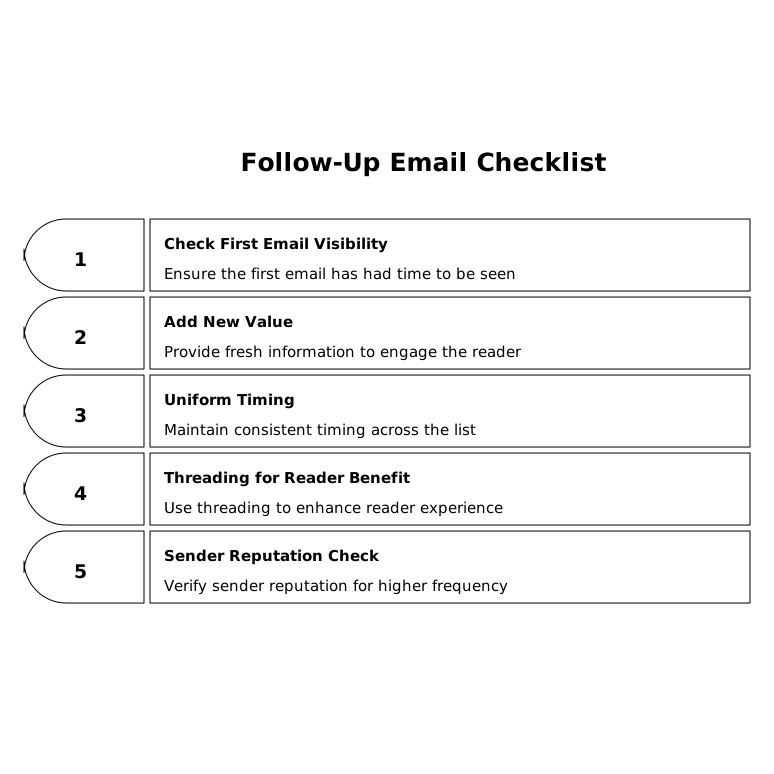
A simple checklist before you send the first follow-up
- Did the first email have time to be seen? If not, waiting is often the most deliverability-friendly move.
- Will this follow-up add new value? Specificity increases replies and reduces “nudge fatigue.”
- Is your timing uniform across a big list? Uniformity is a fingerprint; staggering looks more natural.
- Are you threading because it helps the reader? Not because it hides repetition.
- Is your sender reputation stable enough for higher frequency? If you’re ramping volume, warm up first.
Get these right, and your first follow-up stops being a deliverability liability. It becomes what it should be: a normal, helpful message that earns engagement instead of triggering filters.
Vertical Video