
Why “customer-language” matters more than your internal labels
Feature requests rarely arrive as neat, comparable inputs. They show up as screenshots in chat, half-written tickets, sales call snippets, and emotional one-liners like “This is a dealbreaker.” If you immediately translate that mess into internal product terms, you often lose the exact words customers will use again—making it harder to search, cluster, and quantify demand later.
A customer-language taxonomy solves that. It’s a structured set of themes that stays faithful to original wording while still being consistent enough to report on. Done well, it lets you answer questions like: “How many people asked for SSO?” and also: “How many people said ‘I can’t invite my team’?”—without treating those as unrelated issues.
The Customer-Language Taxonomy method in 6 steps
Step 1: Capture requests as verbatims, not interpretations
The first rule is simple: store the customer’s phrasing before anyone paraphrases it. That includes subject lines, quotes from calls, and the specific complaint or desired outcome. If you only store “Add role-based access control,” you lose the nuance that might be common across many requests, like “I need to restrict what contractors can see.”
In practice, this means your intake workflow should encourage raw text capture: short quotes, pasted sentences, and links to the original context. Many teams centralize this in a feedback hub; for example, canny.io is designed to collect feedback from portals and internal tools while keeping the original request content attached to the idea.
Step 2: Split each request into three parts: problem, desired outcome, constraint
Most “feature requests” are actually a mix of needs. To make them comparable, break each one into:
- Problem: what’s failing or frustrating (“I can’t tell who changed a setting”).
- Desired outcome: what success looks like (“I need an audit trail”).
- Constraint: must-have conditions (“needs to export to CSV,” “must be SOC 2-friendly,” “works on mobile”).
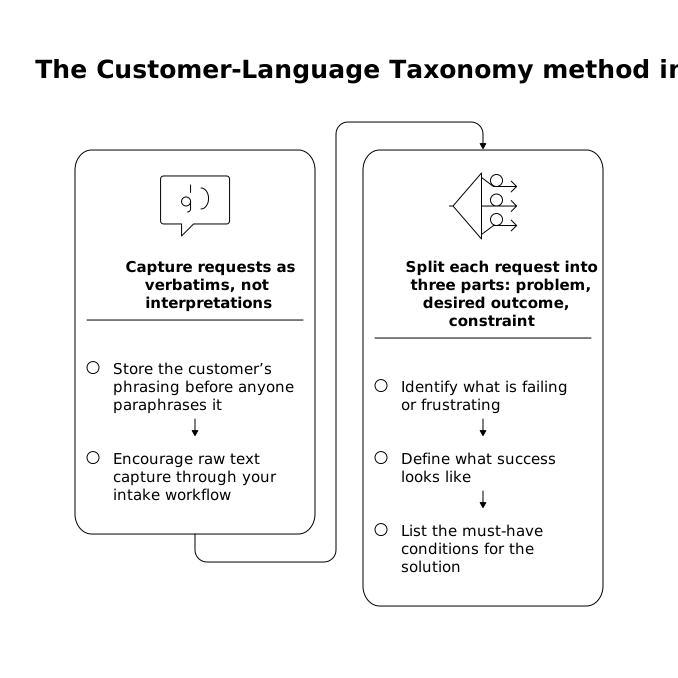
This split prevents taxonomy drift. Two users might ask for different features, but share the same desired outcome. Or they may request the same feature for totally different reasons—important when you later write specs or prioritize.
Step 3: Create “customer themes” that mirror phrasing
Now you can start building themes, but with a strict constraint: theme labels should sound like customers, not like your architecture diagram. Instead of “Authentication: SAML,” consider themes such as:
- “Log in with our company SSO”
- “Require 2FA for everyone”
- “Stop sharing passwords across the team”
These are still structured, but remain searchable using the language customers actually type into support chats and portals. You can keep internal mapping separately (e.g., “SSO/SAML” as an internal tag), but don’t let it replace the customer-facing theme label.
Step 4: Add synonyms without collapsing meaning
The fastest way to make a taxonomy unusable is to force every phrase into a single “official” term. Instead, treat synonyms as a list that points to a theme, not as replacements for the theme.
For each theme, maintain a few “entry phrases” you’ve seen in the wild. Example for a theme like “See what changed and who changed it”:
- “audit trail”
- “activity log”
- “change history”
- “who edited this?”
This gives you search coverage without flattening nuance. “Activity log” could imply different granularity than “audit trail,” and you want to preserve that signal for later.
Step 5: Keep the taxonomy shallow and enforce naming rules
Most product teams overbuild hierarchies. A customer-language taxonomy works best when it’s shallow enough to scan and consistent enough to apply quickly. A practical target is:
- 10–25 top-level theme groups (broad areas like “Inviting teammates,” “Reporting,” “Integrations”).
- 3–12 themes per group (customer-phrased needs).
To keep consistency, add lightweight rules:
- Start themes with a verb when possible (“Export…,” “See…,” “Prevent…”).
- Prefer outcomes over implementations (“Restrict access” vs. “RBAC”).
- One theme = one idea. If you use “and,” it might be two themes.
If you already struggle with request chaos and unclear categorization, the workflow in this support-ticket root-cause tree and fix-priority heatmap guide pairs well with a customer-language taxonomy: the taxonomy captures what people say; the root-cause tree explains why it happens.
Step 6: Make themes measurable without rewriting the customer
The goal is not just organization—it’s decision-making. To make themes measurable, attach metadata that doesn’t distort wording:
- Customer segment (SMB, mid-market, enterprise).
- Revenue impact (ARR at risk, upsell potential, deal blocker).
- Journey stage (evaluation, onboarding, daily use, admin).
- Evidence type (support ticket, sales call, portal post).
This is where centralized feedback tooling helps: a platform like Canny can keep requests deduplicated, preserve the original text, and still let you roll up insights by segment and impact. The trick is to treat themes as a layer on top of verbatims, not a replacement for them.
Quality checks that prevent taxonomy rot
Run a “search test” every week
Pick five new real requests and ask: “If I didn’t know our product, could I find the right theme in under 30 seconds?” If not, you either need better synonyms, clearer theme names, or fewer near-duplicates.
Watch for false duplicates
Two requests can look similar but differ in constraints. “Export reports” might mean “PDF for stakeholders” or “raw CSV for analysis.” Keep them under the same group, but separate themes if the constraints change the build significantly.
Document edge cases and update rules, not just labels
Most taxonomy failures aren’t about the list of themes—they’re about inconsistent application. Keep a short “how we tag” note with examples of tricky cases. If you’re standardizing terminology across systems, the mindset from canonical schemas and input normalization is surprisingly relevant: consistent inputs prevent downstream confusion, whether you’re securing tools or organizing feedback.
What you get when you keep customer wording intact
- Searchability: anyone can find patterns using the language customers use.
- Better synthesis: summaries remain grounded in real phrasing, reducing “internal bias.”
- Cleaner prioritization: you can quantify demand by theme while still reading the original context.
- Faster responses: support and success teams can reference known themes and prior clarifications.
The key is resisting premature translation. Keep verbatims, split requests into comparable parts, build shallow customer-phrased themes, and measure impact with metadata. You end up with a taxonomy that product, support, and sales can all use without losing what customers actually said.