Why AI feature requests are harder to triage than “normal” product feedback
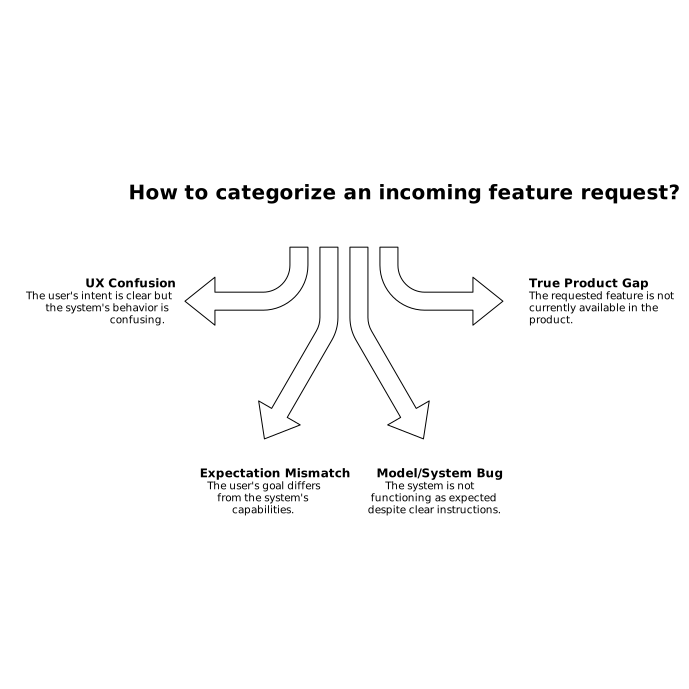
In AI products, a single user message like “It doesn’t work” can mean three very different things:
- Model bug: the system produced an incorrect, unsafe, or inconsistent output because something in the model/prompting/retrieval chain failed.
- UX confusion: the system might be capable, but the UI, wording, defaults, or guidance caused the user to take the wrong action or form the wrong expectation.
- True product gap: the system can’t do the job, even with perfect prompting and a clear interface, because a capability is missing.
If you triage these the same way, roadmaps get polluted with “features” that are actually reliability issues or communication problems. The goal of good triage is to decide what category the request belongs to before you decide priority, owner, or timeline.
A practical triage taxonomy that works in real backlogs
Use a taxonomy that maps cleanly to owners and fixes. A simple version:
- Model behavior bug (accuracy, hallucination, refusal, policy, inconsistency)
- System integration bug (RAG retrieval, tool calling, latency/timeouts, permissions, data freshness)
- UX clarity issue (copy, onboarding, empty states, error messages, affordances, defaults)
- Expectation mismatch (marketing/docs mismatch, ambiguous “AI can do X” claim, unclear constraints)
- Net-new capability (new tool, new workflow step, new data connection, new output format)
This adds just enough nuance to avoid over-labeling everything as “the model is wrong” or “we need a new feature.” It also helps you route issues without weeks of back-and-forth.
The three-question decision tree for every incoming request
When a feature request arrives, force it through three questions. You can do this in a form, in support macros, or in your feedback tool.
1) If the user repeated the same intent with perfect instructions, would it work?
If yes, you likely have UX confusion or an expectation mismatch. If no, you’re looking at a model/system bug or a true product gap.
What “perfect instructions” means in practice:
- The user’s goal is explicit (inputs, constraints, desired output).
- Any required files/permissions are present.
- The system is run in a known-good environment (same plan, same tenant settings).
2) Can we reproduce it reliably with a minimal test case?
If you can reproduce the failure with a small, stable input, treat it as a bug until proven otherwise. If it’s non-deterministic (“sometimes it works”), it’s still a bug—just likely in reliability, retrieval, rate limits, or model variance.
A useful artifact here is a “repro packet”:
- User goal in one sentence
- Exact prompt or UI steps
- Key context (tenant, plan, permissions, integrations enabled)
- Expected vs actual output
- Timestamp and request ID for logs
3) If it’s working-as-designed, is the design actually acceptable?
This is where true product gaps show up. Sometimes the system is behaving exactly as built, but the behavior fails a real user job-to-be-done (for example, “Summarize this call” works, but it can’t cite quotes with timestamps, so it’s unusable for QA).
Only after you answer this question should you open a net-new capability request.
Signals that it’s a model bug vs UX confusion vs a real gap
Strong signals of a model or system bug
- Regression: it used to work last week/month, now it fails.
- Same input, different output: high variance that breaks workflows.
- Tool/RAG mismatch: the answer contradicts retrieved sources or ignores available tool outputs.
- Safety/policy oddities: unexpected refusals or overly broad blocks for benign requests.
- Operational symptoms: timeouts, partial tool calls, missing attachments, slowdowns.
Strong signals of UX confusion
- User is close: they describe the right goal but take the wrong steps.
- Hidden constraints: limits exist (file size, token caps, permissions) but aren’t visible until failure.
- Copy causes misuse: button labels or helper text imply the system will do more than it can.
- Repeated questions: support sees the same “how do I…” threads across many accounts.
Strong signals of a true product gap
- Workarounds are painful: users can’t achieve the goal without exporting, scripting, or manual cleanup.
- Requirement is structural: needs a new integration, a new permission model, a new evaluation layer, or a new workflow step.
- Consistent demand by segment: the request clusters among a meaningful ICP segment (e.g., enterprise support, regulated industries).
How to capture feedback so triage is fast and defensible
Most triage failures come from missing context, not bad judgment. Make every request answerable by design.
- Normalize the “job”: ask for the user’s desired outcome and what “done” looks like.
- Collect evidence: screenshots, logs, model output, the retrieved sources, and any tool call traces.
- Tag by impact: revenue segment, frequency, severity (blocked vs annoyance), and time sensitivity.
- Deduplicate early: group similar requests so you see patterns instead of noise.
This is where a dedicated feedback system helps. With canny.io, teams can centralize requests, dedupe effectively, and track demand by segment so you don’t confuse “loud” with “important.” The same structure also makes it easier to separate reliability work from roadmap work.
Routing and ownership so issues don’t bounce between teams
Once a request is categorized, route it with clear owners:
- Model/system bug → ML/product engineering + on-call, with logs and repro packet
- UX confusion → product design/content design, often fixable with copy, defaults, or guided flows
- Expectation mismatch → product marketing/docs + PM, align claims with reality
- True product gap → PM + eng, scoped as a capability with acceptance criteria
To prevent “urgent” bugs from hijacking the roadmap—or the opposite, where a critical enterprise ask gets stuck behind long-term projects—tie routing to an explicit SLA. If you’re building this discipline, the approach in priority inversion in product backlogs and how to prevent it with SLA triage maps well to AI feedback queues.
Turn triage into learning with a lightweight root-cause loop
Triage should create compounding value. For every meaningful cluster, capture:
- Root cause (prompting pattern, missing retrieval fields, unclear UI step, missing capability)
- Fix type (bug fix, UX change, docs change, new feature)
- Preventive action (evaluation test, monitoring alert, onboarding update)
If you want a repeatable method, the workflow in a 25-minute workflow to turn support tickets into a root-cause tree and fix-priority heatmap is a good model for converting messy AI feedback into a clear action plan.
What “good” looks like after you implement this
- Your roadmap contains fewer “fake features” that are actually reliability or clarity issues.
- Model bugs get reproducible artifacts quickly, reducing back-and-forth.
- UX fixes ship faster because they’re separated from ML work and framed as confusion patterns.
- True product gaps are backed by segment-based demand and clear acceptance criteria.
The payoff is not just cleaner prioritization—it’s trust. Users feel heard because the response matches the nature of their problem, and internal teams stop arguing about whether something is “a bug or a feature.”
Vertical Video