
Why conversation density matters during email warmup
During warmup, most people track the obvious metrics: send volume, bounce rate, and spam complaints. But Gmail and Microsoft 365 also watch something that’s harder to see from the outside: whether your mailbox behaves like a real person in ongoing conversations.
That’s where the “conversation density” problem shows up. If you generate too many brand-new threads while getting too few replies, your sending pattern starts to look like outreach automation. Even if your copy is clean and your domain is properly authenticated, the mailbox can still drift toward spam or promotions because the engagement graph doesn’t look natural.
What “conversation density” means in practical terms
Conversation density is the balance between:
- New threads created (you start the conversation)
- Replies received (others respond, keeping the thread alive)
- Replies sent (you participate in existing threads rather than always initiating)
In normal human email behavior, a meaningful share of sends are responses inside existing threads. Warmup campaigns often do the opposite: they create a high number of one-off “first touches” that never get a reply. This lowers conversation density and can weaken the positive engagement signals mailbox providers rely on.
Why too many new threads trigger filtering signals
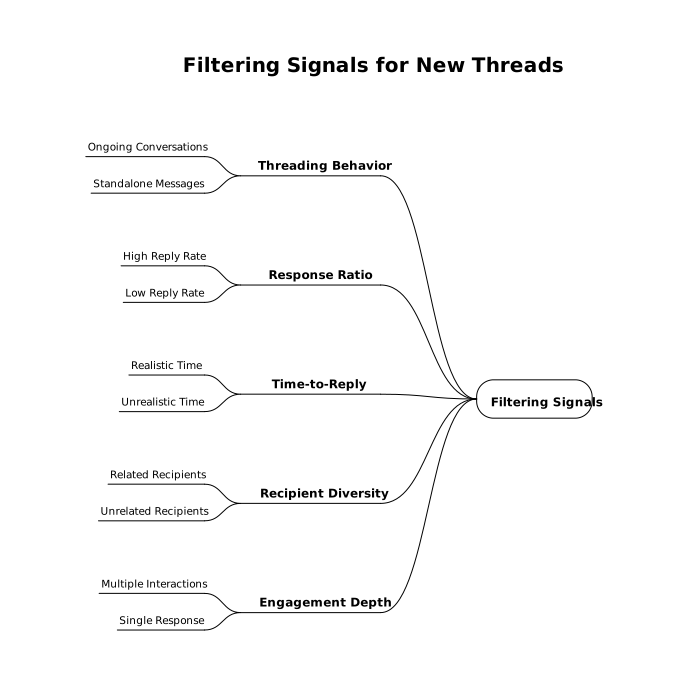
Mailbox providers don’t need to “read” your message to model your behavior. They can score patterns across large volumes of mail, including:
- Threading behavior: Do messages belong to ongoing conversations or stand alone?
- Response ratio: Are recipients replying at a plausible rate?
- Time-to-reply: Are replies happening in realistic time windows?
- Recipient diversity: Are you blasting many unrelated recipients with first-contact emails?
- Engagement depth: Are there multiple back-and-forth interactions or just a single response?
If your mailbox sends 60 emails a day and 55 of them are new threads, you’re effectively training Gmail and Microsoft 365 that your identity is primarily a “starter” rather than a participant. That is a common signature of cold outbound.
How the problem looks in Gmail vs Microsoft 365
Gmail
Gmail tends to be sensitive to engagement quality and user feedback signals. Low conversation density often correlates with other Gmail-visible outcomes: low opens, low replies, and a higher likelihood of “this is spam” actions over time. Gmail also benefits from a history of authentic back-and-forth threads that suggest real relationships.
Microsoft 365 (Outlook)
Microsoft 365 environments commonly add layered filtering (tenant policies, Microsoft filtering, and sometimes third-party gateways). When warmup resembles outbound automation, it can create “suspicious sender” patterns: high first-contact volume, low reply rates, and inconsistent engagement. In practice, that can mean more junk placement or throttling during ramp-up.
Common warmup mistakes that reduce conversation density
- Ramping volume faster than replies can keep up: You increase sends daily, but replies remain flat.
- Too many unique recipients too soon: You look like you’re prospecting rather than conversing.
- Overusing templates: Even if content is “safe,” uniform structure can reduce real engagement.
- Ignoring inbox actions: Warmup isn’t only sending; it’s also reading, replying, moving messages, and behaving like a person.
- Running warmup on multiple new mailboxes in parallel: If all mailboxes start dozens of threads immediately, the whole domain can feel synthetic.
How to increase conversation density without “gaming” it
The goal is not to fabricate engagement. It’s to build a sending pattern that naturally produces the signals inbox providers associate with trusted mailboxes.
1) Make replies a first-class metric
Track replies received per day alongside sends per day. A simple operational rule helps: don’t increase daily new threads unless replies are also trending upward. If you’re only watching send volume, you can accidentally train a low-density pattern for weeks.
2) Shift part of your warmup to existing threads
Instead of always starting a new subject line, maintain ongoing conversations. Even a small change matters: if 30–40% of your outbound during warmup is replies within threads, your behavior looks much closer to a real user.
3) Slow down “first touches” when engagement drops
If opens and replies soften, treat it like a capacity constraint. Pause ramping new threads and spend a few days emphasizing inbox activity and thread participation. This is especially important after weekends or holidays when engagement patterns often change.
4) Keep recipient mix realistic
Warmup works best when recipient relationships look plausible. In a real inbox, you don’t email 80 brand-new people every week. You email a smaller set repeatedly, you reply, and you sometimes restart older threads. That pattern naturally raises conversation density.
5) Make inbox interaction part of the system
High-density conversation behavior isn’t only “replying.” It also includes actions that imply a user is present: opening messages, reading, starring, moving a misfiled email out of spam, and responding with short, contextual replies.
This is one reason dedicated warmup platforms can be helpful. For example, mailwarm focuses on generating authentic engagement signals using real inbox interactions across major providers, which helps you build a reputation that looks less like automated first-touch outreach and more like normal email usage.
Practical warmup targets to avoid the low-density trap
Exact thresholds vary by mailbox age, domain history, and industry, but these practical targets keep most warmups on the safe side:
- Don’t let new threads dominate: Aim for a meaningful share of replies within existing threads.
- Ramp sends gradually: If you increase volume, make sure engagement signals rise with it.
- Prefer steady patterns over spikes: Filtering is often triggered by sudden behavioral changes.
- Watch thread longevity: Back-and-forth conversations across multiple days look healthier than same-day bursts.
If you’re designing workflow monitoring around deliverability, it can help to think in systems terms: what signals are leading indicators, which are lagging, and where do you set guardrails. The same thinking used to enforce per-step SLOs in DAG workflows applies well here: define acceptable ranges for new-thread share and reply rates, then slow down automatically when you’re outside them.
How to diagnose conversation density issues in a real mailbox
You don’t need perfect provider visibility to troubleshoot. Look for these mailbox-side symptoms:
- Sent mail is mostly single-message threads with few “Re:” chains.
- Reply rate is low relative to your daily new thread count.
- Deliverability is inconsistent: inbox some days, spam other days, especially in Microsoft 365 tenants.
- Warmup plateau: increasing volume stops improving inbox placement.
If you see those patterns, the fix is usually not “send more.” It’s to rebalance: fewer new threads, more thread participation, and more realistic inbox activity. Warmup should look like a person rebuilding trust, not a system trying to maximize throughput.
Where conversation density fits in a broader deliverability strategy
Conversation density isn’t a replacement for fundamentals like SPF, DKIM, and DMARC, or for list quality and bounce control. It’s the behavioral layer that becomes especially important during warmup, when your sender history is thin and providers are learning what kind of sender you are.
Once your warmup pattern produces stable, ongoing conversations with consistent engagement, Gmail and Microsoft 365 have more reasons to classify your traffic as wanted. That’s the point where you can scale responsibly without teaching filters that your mailbox exists mainly to start conversations that nobody answers.